11 Best Online and Offline Survey Tools in 2026
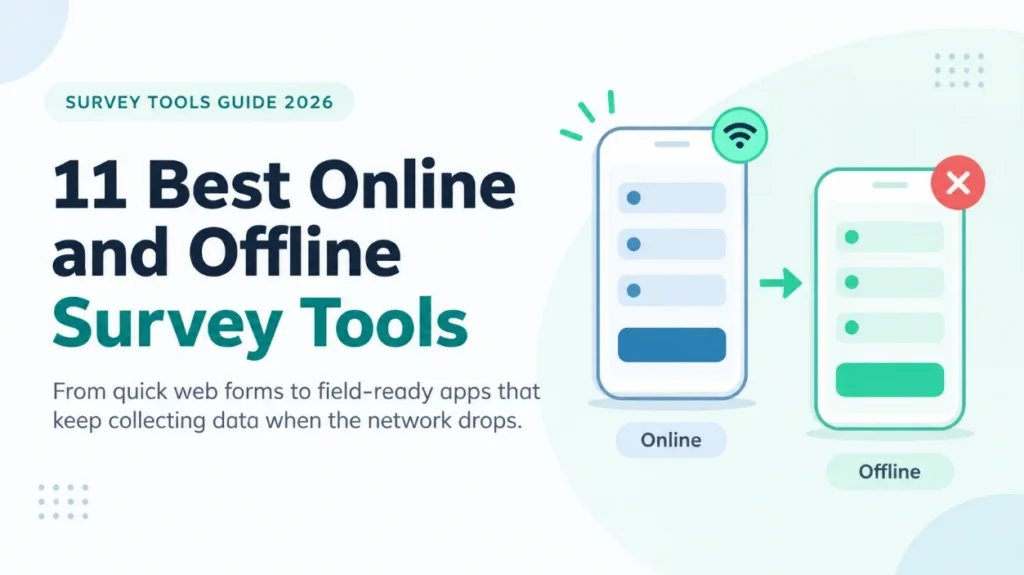
Figure 1: Online and offline survey tools compared in this guide
The best online and offline survey tools is no longer “templates only” choice. Data is gathered in hospitals, villages and factories where the network could break down and the tool must reflect that. This guide outlines 11 tools, ranging from basic web forms through to field-grade apps, and their strengths and weaknesses and who they are best suited for.
Online Survey Tools vs Offline Survey Tools
Online survey tools are those that are available on a web browser and require a live connection from the respondent while they are taking the survey. They take little time to launch, easily shareable via link or email, and are ideal for audiences that are already connected, like customers, employees, students and panel members.
Offline survey tools allow for the questionnaire to be downloaded to a cell phone or tablet. The enumerator can then interview respondents without signal and the app uploads the recorded results as soon as a signal is restored. This is the usual method for conducting household surveys, health evaluations, agricultural research and any other work conducted in low connectivity areas.
There are a number of platforms in between. Mostly on-line products, but provide a mobile application with some offline functionality. As plans vary, check before using the field plan offline what features are included in the plan that you are using.
READ MORE: Best Tools For Field Data Collection in 2026
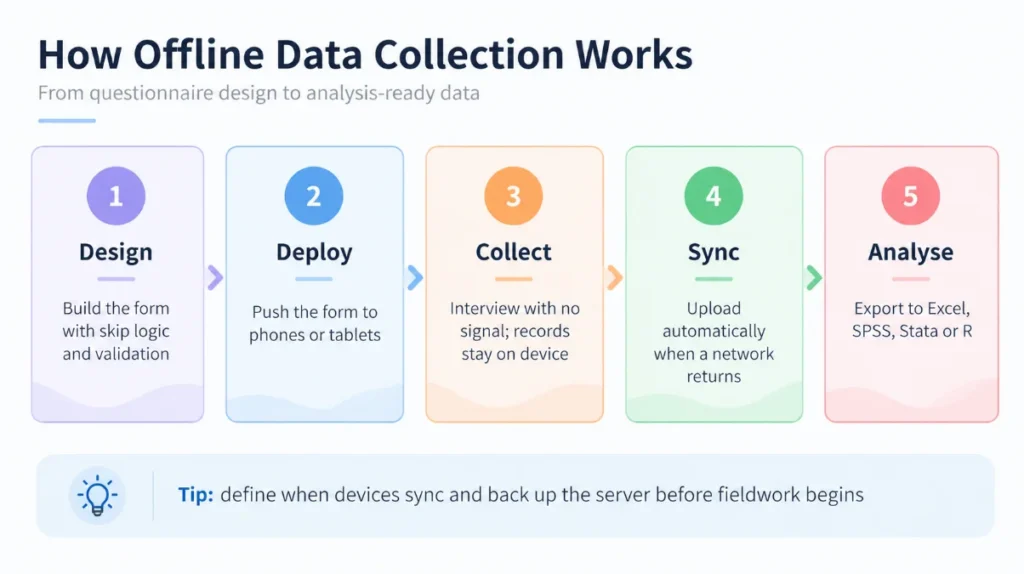
Figure 2: How offline data collection works, from form design to analysis
How to Choose Among the Best Survey Tools
The right choice depends on the study, not on a ranking. Work through these questions before comparing the best survey tools in detail:
1. Connectivity: Will interviews happen where there is no reliable network? If yes, shortlist offline-first tools.
2. Who fills the form: Respondents completing it themselves value a clean, mobile-friendly design. Trained enumerators value speed, validation and skip logic.
3. Question logic: Complex studies need skip patterns, calculations, repeat groups and constraints, which simple form builders handle only partly.
4. Data type: Photos, audio, GPS points and barcodes need a tool built for field capture.
5. Security and compliance: Studies with personal or health data need encryption, access control and a clear data-hosting policy.
6. Budget and scale: Free tools suit small projects, while large multi-site studies often justify a paid platform with monitoring features.
7. Analysis workflow: Check that exports flow cleanly into Excel, SPSS, Stata or R.
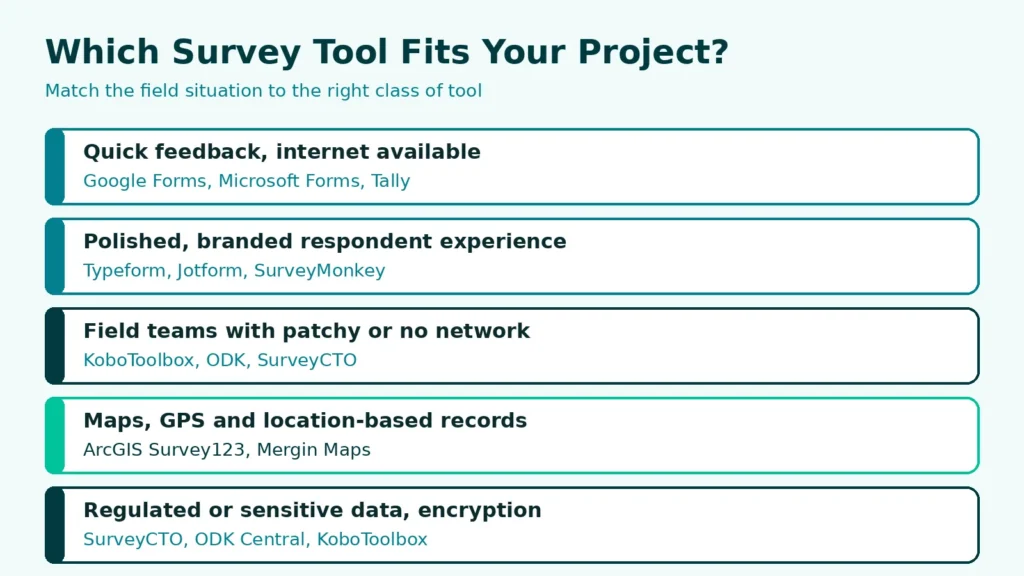
Figure 3: Matching the field situation to the right class of survey tool
The 11 Best Online and Offline Survey Tools in 2026
Online-First Tools
1. Google Forms
A free, browser-based form builder that is part of Google Workspace. It’s the most widely-used initial point for doing basic surveys since anybody with a Google account can construct a form in minutes and forward it through a link.
All responses automatically populate into Google Sheets, and simple charts, sections, branching and file upload for signed-in responders. It cannot be used for remote field work as respondents must have a connection to submit to.
Best for: Quick polls, student projects, event feedback and internal team surveys.
2. Microsoft Forms
It is included as a component of Microsoft 365 for organisations already using Microsoft Teams, Outlook and Excel. Inside or with external respondents, there are forms and quizzes that can be shared.
Excellent Excel Integration, Branching and built in Response Summaries. It also requires a connection to capture the responses, similar to Google Forms.
Best for: Workplace surveys, training evaluations and quizzes inside Microsoft 365 organisations.
3. Typeform
One-at-a-time conversational survey builder, providing a better and more seamless experience for respondents on mobile.
Logic jumps, calculations, hidden fields and an assortment of integrations. It’s good for design polish, but may not be as well suited for large studies with lots of logic for collecting data. Connects to the internet.
Best for: Customer research, lead generation and branded surveys where completion rate and experience matter.
4. Tally
Newer no-code document style editor. It has become popular due to its generous free plan as well as its neat interface which looks similar to a notes application.
Conditional logic, calculated fields, file upload, custom branding and integrations (paid plans). It is online only, not suitable for field enumerators.
Best for: Founders, small teams, NGOs and researchers who want a low-cost online form with a modern look.
Tools with Online and Limited Offline Capability
5. SurveyMonkey
One of the oldest survey platforms, features templates, question bank, analytics and enterprise controls. It’s mobile app will enable responses to be taken in the field.
Skip logic, A/B testing, benchmarks and team collaboration. Its mobile application also offers offline and kiosk-style collections, which are subject to limits based on the plan: Check in advance.
Best for: Market research, customer experience programmes and organisations needing governance and reporting.
6. Jotform
A flexible form platform with thousands of templates, a drag and drop builder and numerous integrations. It also provides survey forms, e-signatures and payment collection.
The Mobile Forms app allows teams to complete forms on mobile devices, even offline, which will be synced later. Conditional logic and widgets are pretty extensive.
Best for: Mixed workflows that combine surveys with registrations, approvals, signatures or payments.
Offline-First Field Tools
7. KoboToolbox
An open source software platform developed by the Harvard Humanitarian Initiative that has been adopted by researchers, universities and NGOs. A web builder or a XLSForm is used to design the forms and these forms are then deployed to the KoboCollect Android app.
Data collected offline with skip logic, validation, GPS, Photos, audio and repeat groups. Data synced to the server as soon as they are connected. Exports can be made in Excel, CSV and SPSS friendly formats. It is one of the best choices for field research on a budget.
Best for: Household surveys, humanitarian assessments, academic fieldwork and monitoring and evaluation.
8. SurveyCTO
The professional field data platform on ODK standard. It provides enterprise capabilities for large and sensitive studies such as robust encryption and data-quality monitoring.
Offline Android collection, advanced form logic, review workflows, audio audits, speed and duplicate checks and role-based access. Its paid and scaling depends upon usage and features.
Best for: Large multi-site studies, impact evaluations and projects with strict data-protection needs.
9. ODK (Open Data Kit)
Over the years, many field tools have been developed and adopted by an open-source community. All of ODK is designed for Android, with ODK Central being the server application which manages forms, submissions and users.
Full OFFLINE and XLSForm authoring and full control of the data hosting. Requires technical set up and maintenance, for teams that have IT support.
Best for: Organisations that want self-hosted, fully controlled infrastructure.
10. ArcGIS Survey123
Field tool developed by Esri that is based on a form. Forms are used to create surveys and they are directly associated with spatial layers.
Field app, offline, GPS capture, maps, dashboards and integration with ArcGIS Online. It demands an ArcGIS licence, which is well suited for teams already in the Esri fold.
Best for: Utilities, urban planning, environmental monitoring and any survey where location is central.
11. Mergin Maps
A newer mobile field-collection app built on QGIS. Projects are prepared in QGIS and synced to phones, so spatial teams can collect points, lines and polygons with attributes and photos.
Works offline, supports GPS capture and syncs changes through a cloud service. It suits GIS practitioners who already use QGIS and want a lighter alternative to heavier platforms.
Best for: Spatial surveys, asset inventories and field mapping using open-source GIS.
Comparison of the Best Online and Offline Survey Tools
The table below summarises how the 11 tools compare on offline support, cost model and ideal use. It helps shortlist options before testing them with a pilot form.
| Tool | Offline Collection | Cost Model | Standout Strength | Best Fit |
| Google Forms | No | Free with Google account | Simplicity and Sheets link | Quick polls and feedback |
| Microsoft Forms | No | Included with Microsoft 365 | Excel and Teams integration | Workplace surveys |
| Typeform | No | Freemium, paid tiers | Conversational design | Branded customer surveys |
| Tally | No | Freemium, paid tiers | No-code, modern interface | Small teams and NGOs |
| SurveyMonkey | Via mobile app (plan-dependent) | Freemium, paid tiers | Analytics and templates | Market research |
| Jotform | Via Mobile Forms app | Freemium, paid tiers | Integrations and flexibility | Mixed form workflows |
| KoboToolbox | Yes | Free | Field-ready, open source | Research and humanitarian work |
| SurveyCTO | Yes | Paid subscription | Security and data-quality tools | Large, sensitive studies |
| ODK | Yes | Free, self-hosted | Full control and flexibility | Technical teams |
| ArcGIS Survey123 | Yes | Requires ArcGIS licence | Spatial integration | Location-based surveys |
| Mergin Maps | Yes | Freemium, paid tiers | QGIS-based field mapping | Open-source GIS teams |
Best Practices for Using Survey Data Collection Tools
Even the best survey data collection tools produce poor data when the form is badly designed or the rollout is rushed. These practices apply across every platform in this guide:
1. Pilot before launch. Test the form on real devices with a small group. Pilots expose unclear wording, broken logic and slow screens.
2. Build in validation. Use required fields, range limits, constraints and consistency checks so errors are caught at entry, not during cleaning.
3. Keep forms short. Long questionnaires reduce completion rates and tire enumerators. Remove questions that do not serve a defined analysis.
4. Plan for sync. For offline work, define when and where devices upload data, and back up the server regularly.
5. Protect respondents. Collect only the personal data you need, use encryption where available, and restrict who can download records.
6. Train enumerators. Even the best tool depends on how well field staff use it. Run a briefing with practice interviews.
7. Monitor quality during collection. Review daily submissions for duplicates, outliers and missing values while the team is still in the field.
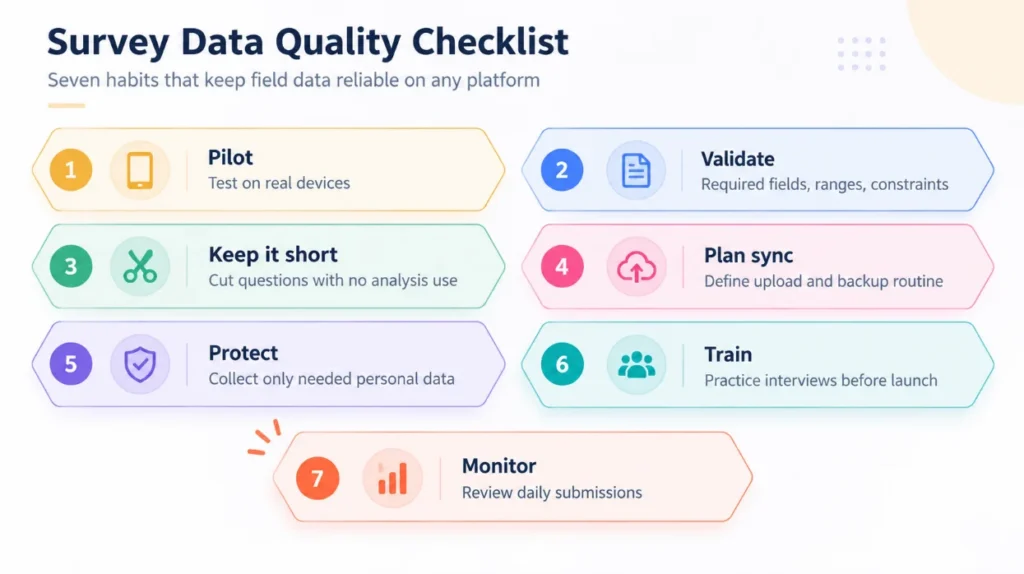
Figure 4: Survey data quality checklist for field and online surveys
Survey Tools for Research: What Academic and Field Teams Need
A more recent mobile application for data collection, using QGIS. Projects are created in QGIS and uploaded to phones, and can be used to gather points, lines and polygons with associated attributes and photos, from spatial teams.
Operates without internet connection, allows GPS capture and synchronizes changes via cloud service. It is good for GIS users who are already familiar with QGIS and who are looking for an alternative to the heavier platforms.
Setting Up Survey Data Collection with Simbi Labs
The priorities of the research use of survey tools are different from that of marketing use. Researchers require repeatable instruments, version control of questionnaires, data handling and clean export of data for statistical software packages that meet the ethics requirements. They include tools like KoboToolbox, SurveyCTO and ODK, which enable teams to create the questionnaire in a spreadsheet and share it with colleagues and reuse it in other projects.
- Tool selection and setup for KoboToolbox, ODK, SurveyCTO and online platforms, matched to your study design
- Questionnaire programming with skip logic, validation, multilingual forms and GPS capture
- Field data collection support including online and offline survey data entry services
- Data cleaning and analysis in SPSS, Stata, R and Excel, with reporting for publication or client delivery
Planning a survey and unsure which tool fits? Book a free consultation at app.simbilabs.com/appointment, email grow@simbi.in or call +91-99505-66669 to discuss your project with the Simbi Labs team.
Conclusion
The best online and offline Survey tools are those that are best suited to your respondents, field conditions and analysis plan. Google Forms, Microsoft Forms, Typeform and Tally are fast and inexpensive options in the event of good connectivity. Field-grade tools like KoboToolbox, SurveyCTO, ODK, ArcGIS Survey123 and Merging Maps safeguard your data when the network goes down. Begin by testing out a pilot, check your reasoning and select a tool that smoothes the whole process—from the initial interview to the final analysis.
To get an expert’s assistance in designing surveys, data collection and analysis, reach out to Simbi Labs India’s Research and Analytics Division, Simbi Labs.
Frequently Asked Questions
1. What are the best online and offline survey tools in 2026?
The strongest options depend on the study. For simple web surveys, Google Forms, Microsoft Forms, Typeform and Tally work well. For field research without internet, KoboToolbox, SurveyCTO, ODK, ArcGIS Survey123 and Mergin Maps are better suited. SurveyMonkey and Jotform sit between the two with mobile apps.
2. Which survey tool works best offline?
KoboToolbox is the most widely used free option for offline data collection, and SurveyCTO is a strong paid choice for large or sensitive studies. ODK offers the same capability for teams that prefer self-hosting. Spatial teams often choose ArcGIS Survey123 or Mergin Maps.
3. Are Google Forms and Microsoft Forms suitable for offline surveys?
Not for collecting responses in the field. Respondents need an internet connection to open and submit them. They are best for connected audiences.
4. What is the difference between online and offline survey tools?
Online tools need a live connection while the form is filled. Offline tools store responses on the device and upload them later, which makes them suitable for remote locations.
5. Which survey tools are best for research?
Researchers usually prefer tools that support complex logic, validation, version control and clean exports. KoboToolbox, SurveyCTO and ODK meet these needs, and they work with XLSForm so questionnaires can be reused.
6. Is KoboToolbox free?
KoboToolbox is free for research and humanitarian use, with usage limits and other conditions. Check its current terms for large projects or commercial use.
7. How do I secure survey data collected on mobile devices?
Use encrypted forms where available, lock devices with passcodes, restrict server access by role, collect only necessary personal data and back up regularly. For sensitive studies, consider SurveyCTO or a self-hosted ODK Central server.
8. Can Simbi Labs help set up and run my survey?
Yes. Simbi Labs supports tool selection, questionnaire programming, field data collection, data cleaning and analysis for research and commercial projects.