
DrillBit Plagiarism Report: How to Check, Read, and Reduce the Similarity Index
Why Most People Misread a DrillBit Plagiarism Report?
A DrillBit Plagiarism Report is much more than a percentage showing text similarity. It is a detailed plagiarism report that compares your document with online sources, academic journals, research publications, institutional repositories, and previously submitted assignments to identify matching content. Many students assume that a high similarity score automatically means plagiarism, while a low score guarantees originality. In reality, neither assumption is always correct.
Learning how to check a DrillBit plagiarism report correctly helps you distinguish between acceptable similarity, properly cited references, and genuine plagiarism. For example, your bibliography, quoted text, institutional templates, and commonly used academic phrases may contribute to the similarity index without violating academic integrity.
READ ALSO : How to Reduce DrillBit Similarity Index for University Submissions
This comprehensive guide explains how to read every section of a DrillBit Plagiarism Report, interpret the similarity score accurately, identify genuine plagiarism, and reduce the DrillBit similarity index using ethical writing and proper citation techniques.
DrillBit Plagiarism Report at a Glance
| Feature | What It Shows |
| Similarity Score | Overall matching percentage |
| Source List | Websites and documents with matching text |
| Highlighted Text | Sentences similar to existing content |
| Citation Detection | Properly referenced content |
| Excluded Sections | Bibliography, quotations, templates |
| Recommended Action | Rewrite, cite or ignore based on context |
The Purpose of a DrillBit Plagiarism Report
A DrillBit Plagiarism Report is designed to evaluate the originality of your academic work by comparing it with a wide range of published and unpublished sources. Rather than simply generating a similarity percentage, the plagiarism report highlights matching text, identifies the original sources, and provides detailed information about where similarities occur within your document.
The report helps students, researchers, universities, and faculty members identify sections that require revision before submission. It also distinguishes between acceptable similarities, such as properly cited quotations or bibliographies, and problematic similarities caused by copied or poorly paraphrased content.
Instead of treating the report as a pass-or-fail result, consider it a quality assessment tool. Understanding each section of the report allows you to improve your writing, strengthen citations, and maintain academic integrity while reducing unnecessary edits.
Read Also : AI Content Humanization for Turnitin Approval: Complete Guide
How to Check a DrillBit Plagiarism Report
Many users search for how to check a DrillBit plagiarism report, but simply viewing the similarity percentage is not enough. A proper review involves analyzing every section of the report to understand why similarities occur and whether they require correction.
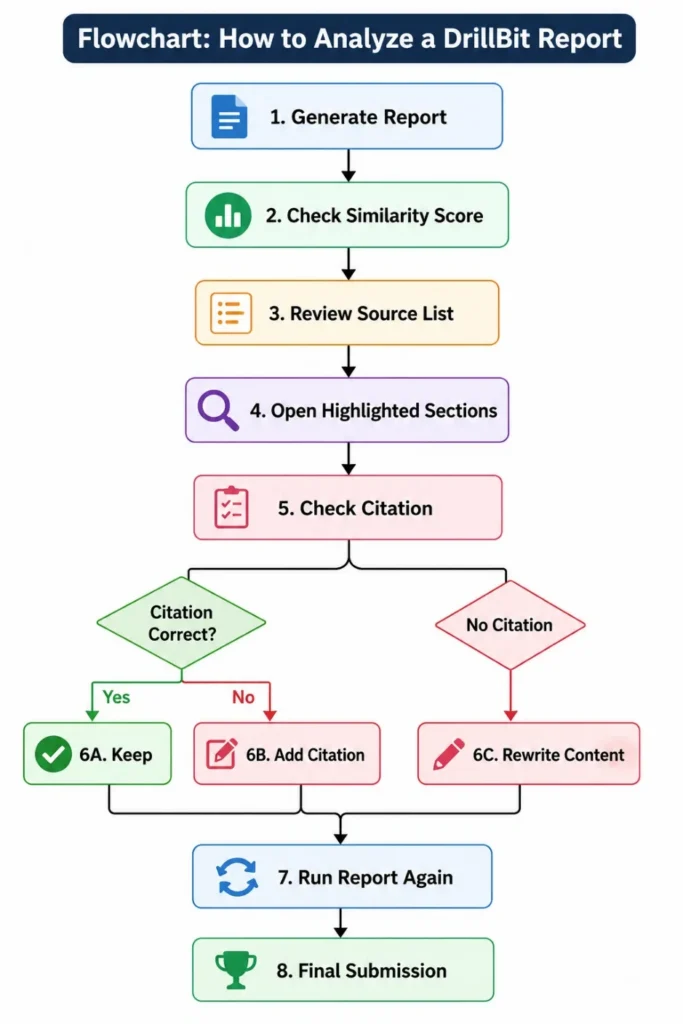
Follow these steps to check your report effectively:
Step 1: Open the Plagiarism Report
Once your document has been scanned, open the generated DrillBit Plagiarism Report and review the overall similarity percentage displayed on the dashboard.
Step 2: Review the Similarity Score
The similarity score indicates the percentage of text that matches existing sources. Remember that this percentage does not automatically represent plagiarism. Properly cited references, quotations, and standard academic phrases may also contribute to the score.
Step 3: Examine the Matched Sources
Open the list of matched websites, journals, books, or institutional repositories. Pay attention to sources contributing the highest percentage of similarity, as these are usually the first areas that require review.
Step 4: Check Highlighted Passages
Read every highlighted sentence carefully. Determine whether the similarity is caused by:
- Correctly cited quotations
- Common academic terminology
- Institutional templates
- Properly referenced content
- Uncited copied text
Step 5: Verify Citations
Ensure every borrowed idea, statistic, quotation, and research finding includes an appropriate citation. Missing citations are one of the most common reasons for high similarity reports.
Step 6: Revise and Recheck
Rewrite poorly paraphrased content, improve citations where necessary, and generate another plagiarism report to confirm that the similarity has been reduced appropriately.
READ ALSO : DrillBit vs Turnitin: Which Plagiarism Checker Performs Better in 2026?
Why You Shouldn’t Focus Only on the Similarity Score
A lot of users tend to be quickly drawn to the percentage at the top of the report. This figure only gives a broad sense but does not show the full picture.
For example:
| Similarity Score | Reality |
| 5% | A paragraph that has been copied from another source and not cited. |
| 18% | May include mostly properly referenced sources. |
| 30% | Might include bibliography, templates, or standard terminology |
| 45% | Needs a detailed investigation to make a decision |
Anatomy of a DrillBit Plagiarism Report
Create a table that explains every section.
| Report Section | Purpose | Why It Matters |
| Similarity Score | Overall matching percentage | Indicates overall overlap |
| Source List | Displays matching websites and documents | Helps identify copied content |
| Highlighted Text | Shows matched sentences | Makes corrections easier |
| Match Percentage | Contribution of each source | Identifies major duplication |
| Citation Matches | Recognizes properly cited material | Prevents unnecessary edits |
| Bibliography | Lists references | Usually excluded from plagiarism analysis |
| Excluded Content | Quotes, references, templates | Reduces false positives |
How DrillBit Scans Documents for Plagiarism
Many people believe plagiarism software compares documents only with Google search results. In reality, a DrillBit Plagiarism Report is generated by comparing your document against multiple content repositories using advanced similarity detection algorithms.
Depending on institutional settings, DrillBit may compare your document with:
- Academic journals and research publications
- Online websites and web pages
- Student assignments submitted previously
- Institutional repositories
- Digital libraries
- Open-access research databases
- Conference papers
- Books and reference materials
After comparing your document with these sources, DrillBit identifies matching text, calculates the similarity percentage, highlights duplicated passages, and generates a detailed plagiarism report for review.
READ ALSO : Common Reasons for High DrillBit Similarity Score (And Fixes)
Step-by-Step DrillBit Plagiarism Report Analysis
Step 1: Review the Overall Similarity Score
Begin with the similarity percentage and never use the percentage alone to make a decision.
Ask:
1. Are the percentages exceptionally high or low?
2. Did the bibliography contain the information necessary to find the author’s sources?
3. Were quotations excluded?
Step 2: Select the type of source you want to add:
Rank the sources according to the percent match.
Target first the bigger sources of duplicate content.
Step 3: Identify Highlighted Passages
Carefully read each sentence that is highlighted.
Find out if the match is:
- Common terminology
- Proper quotation
- Correct citation
- Direct copying
- Accidental duplication
Step 4: Evaluate the Context
Not every highlighted sentences are issues
For example:
It is important that clinical trials are conducted with informed consent.
This is a common sentence in many research papers, as it is typical of academic writing.
Step 5: Key High Risk Matches
Review:
- Entire copied paragraphs
- Consecutive highlighted sentences
- Matches from a single source
- Missing citations
Best Practices Before Uploading Your Document to DrillBit
Before generating a plagiarism report, take a few minutes to review your document. Ensure that every borrowed idea has an appropriate citation, quotations are clearly marked, and the bibliography is complete.
Remove unnecessary duplicate text, avoid excessive direct quotations, and proofread your writing for clarity. Performing these checks before running DrillBit often results in a more accurate similarity report and reduces the amount of editing required later.
Read Also : DrillBit Acceptable Similarity Score for Colleges and Universities
Best Practices Before Uploading Your Document to DrillBit
Before generating a plagiarism report, take a few minutes to review your document. Ensure that every borrowed idea has an appropriate citation, quotations are clearly marked, and the bibliography is complete.
Remove unnecessary duplicate text, avoid excessive direct quotations, and proofread your writing for clarity. Performing these checks before running DrillBit often results in a more accurate similarity report and reduces the amount of editing required later.
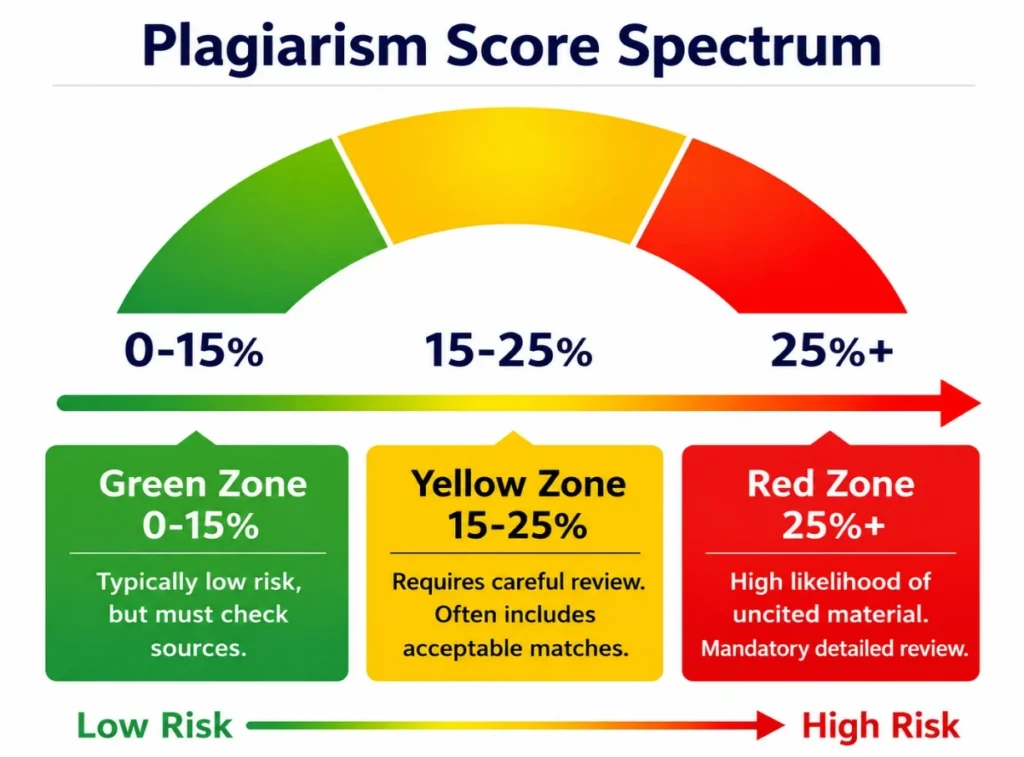
High Similarity Score Explained
| Reason | Genuine Problem? | Solution |
| Direct copy-paste | Yes | Rewrite completely |
| Missing citations | Yes | Add proper references |
| Long quotations | Sometimes | Shorten quotations |
| Common definitions | Usually No | Leave unchanged if appropriate |
| Bibliography | No | Exclude references |
| Assignment template | No | Exclude template text |
A few insights from the analysis of the DrillBit Plagiarism report.
Case Study: The following is a case study of a DrillBit report.
Suppose that a student turns in a research paper that is 28 percent similar to a previously published paper. A detailed review reveals that:
READ ALSO : How DrillBit Detects AI Content and Paraphrased Text
a. 12% from bibliography.
b. There are 8% who have included the right quotes.
c. 5% due to the university’s assignment template d. 3% is uncited copied text.
Strategies for Creating Original, Plagiarism-Free Content
Do not use synonyms for words, but rather, show understanding of what is being said.
Effective strategies include:
- Restate ideas in your own words.
- Use information from several texts.
- Make up examples and/or explanations.
- Include proper citations.
- Divide longer copied paragraphs into smaller, self-contained paragraphs.
- Ensure all borrowed ideas are properly referenced.
Mistakes to Avoid
| Mistake | Better Approach |
| Editing only highlighted words | Rewrite complete ideas |
| Overlook quotations | Quote all borrowed concept |
| Pursuing a very low similarity score | Emphasize originality and authenticity |
| Removing reference | Accurate citations |
| Blindly using AI rewriters | Review and revise manually |
Final Checklist Before Submission
| ✓ | Review Item |
| □ | Checked overall similarity score |
| □ | Checked overall similarity score. |
| □ | Rewrote uncited copied sections. |
| □ | Verified all citations. |
| □ | Excluded bibliography(where permitted). |
| □ | Re-ran the plagiarism report. |
| □ | Verified the document is written at a natural level. |
Here are brief highlights from the report analysis of DrillBit.
You should consider a DrillBit plagiarism report more than just a similarity checker, but a quality review tool. Look at the matched sources, the highlighted text and the citation information to learn the reasons for similarities rather than focusing just on the percentage. Analyzing reports means detecting true plagiarized text, differentiating between similar and problematic text passages, and carefully revising the text to retain the original meaning of the report.
A systematic review process can help with enhancing content originality and academic integrity, and submit assignments with a higher level of confidence. The true goal isn’t to get the lowest similarity score, it’s to create genuine, researched and properly cited content that conveys your own understanding.
Book a free consultation for appointment
Email us at : grow@simbi.in