
NetLogo BehaviorSpace Tutorial for Simulation Experiments

Introduction
After building an agent-based model in NetLogo, the next step is often to evaluate how the model behaves under different conditions. Running a simulation once may provide useful insights, but research and analysis typically require multiple experiments with varying parameter values. This is where BehaviorSpace becomes an essential tool. BehaviorSpace is NetLogo’s built-in experiment manager that automates simulation runs, allowing users to test different parameter combinations, perform sensitivity analyses, and collect results efficiently. If you’re looking for a NetLogo BehaviorSpace tutorial, this guide explains how to configure experiments, perform parameter sweeps, and export simulation results for further analysis.
READ THIS ALSO : Getting Started with NetLogo for Agent
What Is BehaviorSpace?
BehaviorSpace is a feature included in NetLogo that enables users to automate repeated simulation experiments. Instead of manually adjusting sliders and running the model multiple times, BehaviorSpace systematically changes parameter values, executes the simulation, and records the selected output metrics.
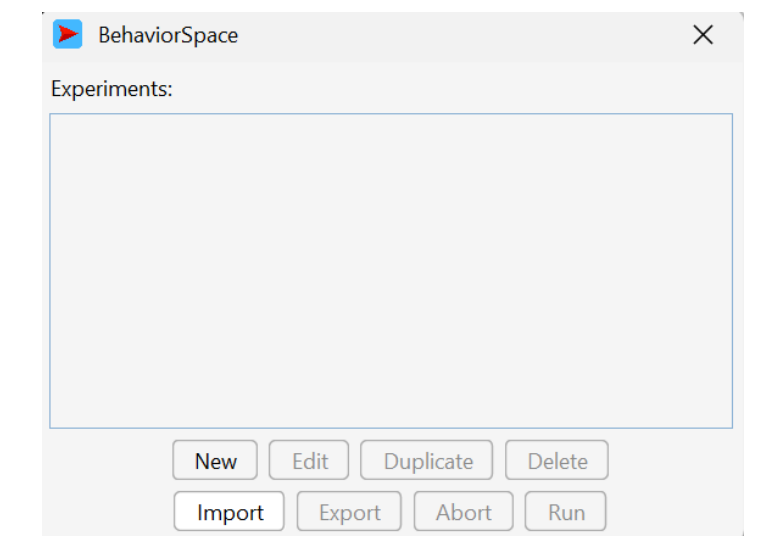
This feature is especially useful for:
- Parameter sensitivity analysis
- Comparing multiple simulation scenarios
- Testing model robustness
- Reproducing experiments
- Collecting data for statistical analysis
Whether you’re a student or a researcher, BehaviorSpace simplifies large-scale experimentation and improves the reliability of simulation studies.
Why Use BehaviorSpace?
Running simulations manually can be time-consuming and prone to errors, particularly when testing numerous parameter combinations. BehaviorSpace eliminates this repetitive work by automating the entire experimental process. Some key advantages include:
- Automatically running hundreds or thousands of simulations
- Testing multiple parameter combinations
- Ensuring consistent experiment settings
- Recording output metrics automatically
- Exporting results for analysis in spreadsheet or statistical software
These capabilities make BehaviorSpace an indispensable tool for agent-based modeling research.
Opening BehaviorSpace
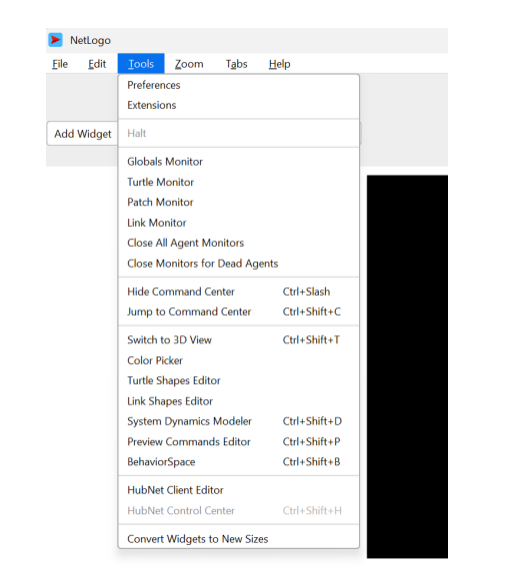
To begin using BehaviorSpace:
- Open your NetLogo model.
- From the menu bar, select Tools.
- Click BehaviorSpace.
- Select New to create a new experiment.
The experiment editor allows you to define how your simulations will be executed.
Configuring an Experiment
A typical NetLogo experiment setup for agent-based modeling includes several important settings.
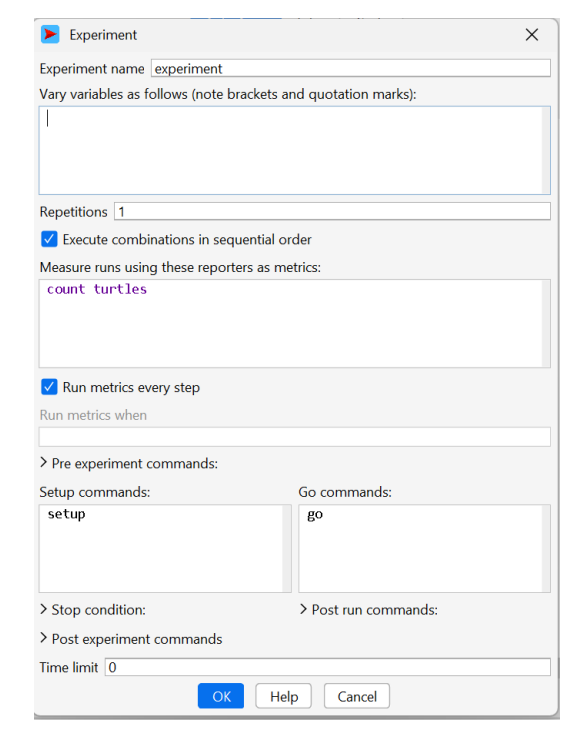
Experiment Name
Give your experiment a descriptive name so it can be easily identified later.
Setup Command
Specify the procedure that initializes your model. In most cases, this is:
setup
Go Command
Enter the procedure that runs the simulation.
go
Stop Condition
Define when the experiment should stop. For example:
not any? turtles
or
ticks >= 500
Choosing an appropriate stopping condition ensures that every simulation finishes consistently.
Defining Variable Parameters
One of BehaviorSpace’s most powerful features is the ability to vary model parameters automatically.For example, suppose your model contains sliders such as:
- Population Size
- Walking Speed
- Resource Density
You can specify multiple values for each parameter, allowing Behavior Space to test every possible combination. This process is commonly called a NetLogo Behavior Space parameter sweep example, where the software systematically explores the effects of changing model inputs.
For instance:
- Population Size = 100, 200, 300
- Walking Speed = 0.8, 1.0, 1.2
- Resource Density = 20, 40
Behavior Space automatically generates and executes all parameter combinations without requiring manual intervention.
Selecting Output Metrics
After defining input parameters, choose the variables you want to record during each simulation.
Common output measures include:
- Number of surviving agents
- Total simulation time
- Average energy level
- Population size
- Resource consumption
- Average movement speed
Behavior Space stores these values after every run, making it easier to compare experimental outcomes.
Running Multiple Simulations
Many simulation studies require repeated runs because random events can influence the results. BehaviorSpace allows you to specify the number of repetitions for each parameter combination.
For example, instead of running one simulation for each configuration, you might perform 30 repetitions to calculate average outcomes and reduce the influence of randomness. This answers one of the most common beginner questions: How to run multiple simulations in NetLogo. Rather than repeating experiments manually, BehaviorSpace handles the repetitions automatically, ensuring that every run follows the same procedure.
Exporting Results to CSV
After completing all experiments, BehaviorSpace can save the collected data for further analysis.
One of its most useful features is the ability to export results to CSV, allowing users to analyze simulation outputs using spreadsheet applications or statistical software such as Microsoft Excel, R, Python, SPSS, or MATLAB. When using NetLogo BehaviorSpace export results to CSV, each row typically represents one simulation run, while the columns contain:
- Parameter values
- Repetition number
- Output metrics
- Final simulation statistics
This structured format simplifies data visualization, statistical testing, and report preparation.
Best Practices for BehaviorSpace Experiments
To obtain reliable and reproducible results, consider the following recommendations:
- Use descriptive experiment names.
- Test small parameter ranges before running large experiments.
- Perform multiple repetitions for stochastic models.
- Record only the output variables needed for analysis.
- Save experiment settings for future use.
- Verify the stop condition before launching long-running experiments.
- Organize exported CSV files using meaningful filenames.
Following these practices improves both efficiency and reproducibility.
What’s Next?
BehaviorSpace is one of NetLogo’s most powerful tools for conducting systematic simulation experiments. By automating parameter sweeps, executing multiple simulation runs, and exporting results for statistical analysis, it transforms a single model into a powerful research platform. Once you’re comfortable creating BehaviorSpace experiments, you can explore advanced topics such as sensitivity analysis, optimization, and integration with external tools like R or Python for deeper data analysis. Mastering BehaviorSpace will not only save time but also help you conduct more rigorous and reproducible agent-based modeling studies.
Book a free consultation for appointment
Email us at : grow@simbi.in