NetLogo Models Library Tutorial: Examples, Models & Guide
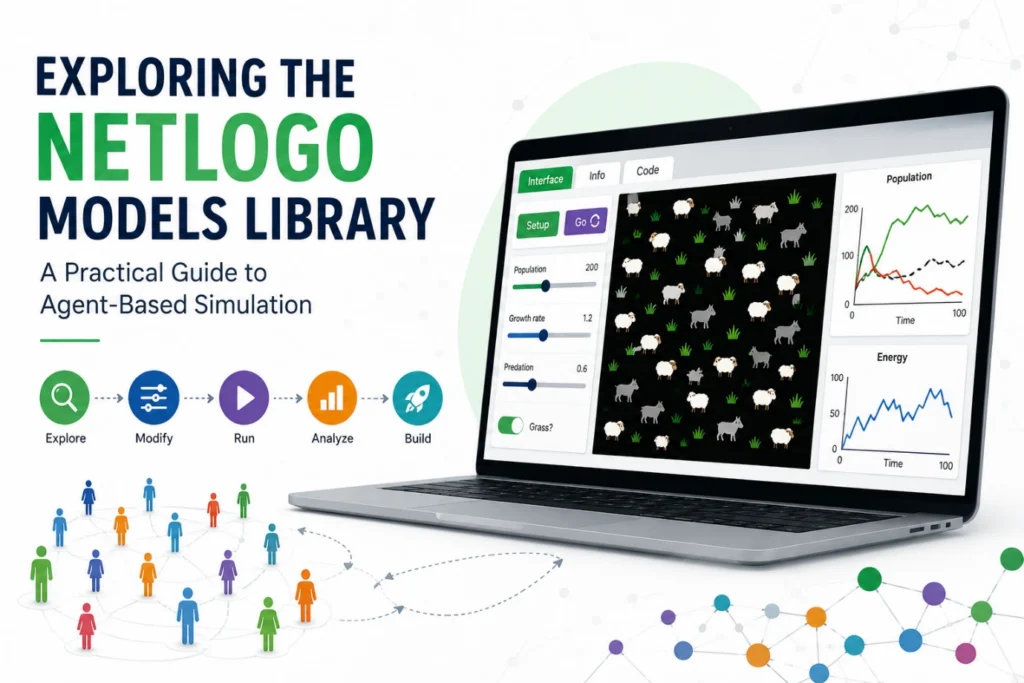
Learning NetLogo becomes more effective when learners study working models rather than writing code from scratch. The NetLogo Models Library lets users run simulations, examine their logic, modify parameters and understand how simple agent rules create complex behaviours.
The library connects programming with experimentation, making it useful for beginners, students, researchers and professionals. Users can explore simulations of population dynamics, traffic, coordination and other systems while directly examining the code behind them. At the time of writing, NetLogo 7.0.4 is the current documented release, featuring a modernised interface, the .nlogox model format and updates to library models. See the NetLogo Version History for recent changes.
READ THIS: Ultimate NetLogo BehaviorSpace Tutorial for Better Results
The Architecture Behind a NetLogo Simulation
A NetLogo model is more than an animation. Its Interface, Info and Code components work together to connect the model’s concepts with its simulation logic. The Interface provides controls and visual outputs, the Info section explains objectives, assumptions and rules, while the Code defines variables, procedures and agent behaviours.
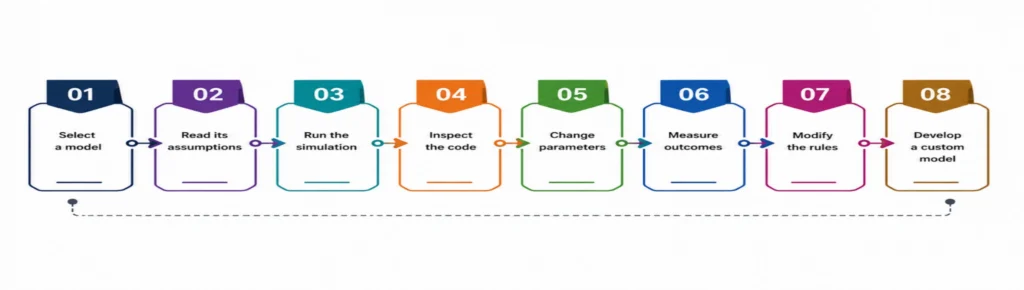
A useful learning sequence is to understand the model, observe its behaviour, and then examine the code. This makes the programming logic easier to interpret within its underlying assumptions.
A Smarter Route Through the Models Library
Rather than exploring models randomly, learners can choose them based on the concept they want to understand. Ecological models demonstrate population dynamics, network models show connectivity, traffic models illustrate congestion, and social simulations reveal how individual decisions shape collective outcomes.
The library evolves alongside NetLogo, with new and updated models added over time, making it a continually developing learning resource.
Figure 1. Learning Path from a Library Model to a Custom NetLogo Simulation
How to Access the NetLogo Models Library
Open NetLogo, select File → Models Library, and choose a model to explore. Start with the Info tab to understand its purpose and instructions, then use the Interface tab to run the simulation and observe its behaviour.
Once familiar with the model, examine the Code tab to understand the rules and procedures behind the simulation. This read–run–observe–inspect approach helps learners understand existing models before creating or modifying their own. For the latest software information, refer to NetLogo Documentation.
Five Models That Reveal How Complex Behaviour Emerges
Several well-known models provide particularly useful entry points into agent-based thinking.
- Wolf Sheep Predation demonstrates predator–prey feedback and how reproduction, movement and resource availability affect populations over time.
- Fire illustrates spatial propagation, showing how local conditions can create large-scale patterns.
- Ants demonstrates distributed coordination, where simple rules and pheromone interactions produce organised behaviour.
- Flocking shows how local separation, alignment and cohesion rules create coordinated group movement.
- Traffic Basic demonstrates how interactions between vehicles can produce system-level congestion.
Table 1. Selected NetLogo Models and the Concepts They Demonstrate
| Model | Core Concept | What to Investigate |
| Wolf Sheep Predation | Feedback and population dynamics | Predator–prey balance |
| Fire | Spatial propagation | Density and spread |
| Ants | Distributed coordination | Pheromone effects |
| Flocking | Emergence | Local movement rules |
| Traffic Basic | Collective behaviour | Congestion formation |
Turning Simulation Runs into Experiments
Simply changing sliders and watching animations offers limited learning. A stronger approach treats the simulation as an experiment. For example, learners can systematically vary tree density in a forest-fire model, repeat runs and record the proportion of forest affected. This is important because stochastic models may produce different outcomes under the same settings.
Useful experimental practices include:
- Change one key parameter at a time.
- Repeat stochastic simulations.
- Record measurable outputs.
- Compare parameter combinations systematically.
- Document model assumptions before interpreting results.
NetLogo’s BehaviorSpace supports this process by running experiments across parameter combinations and collecting measurements.
From Interface Controls to Agent Behaviour
Library models show how simple interface controls, such as sliders and switches, can change model parameters and influence agent decisions or movement. As these rules operate across many agents and time steps, they can produce complex system-level patterns.
This illustrates a key principle of agent-based modelling: complex outcomes can emerge from simple rules operating at the individual level.
Figure 2. From Interface Parameters to Emergent System Behaviour
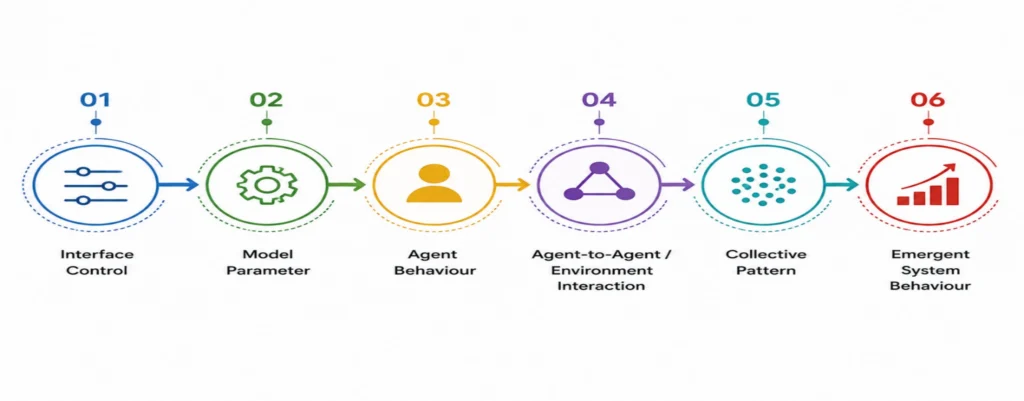
he figure illustrates why exploring a NetLogo model requires more than adjusting its interface controls. By tracing how a parameter is incorporated into the model code and influences agent behaviour, learners can understand the mechanisms responsible for the observed outcome. This approach shifts NetLogo from being viewed simply as a visual simulation tool to being understood as a framework for constructing and investigating computational models.
Extending Existing Models into Research Models
Once a model is understood, users can meaningfully modify it by adding agent variables, changing movement rules, introducing environmental conditions, or creating new controls and measurements. For research, however, modifications should represent clearly defined mechanisms and produce outputs that can be systematically evaluated.
A useful progression is:
Run → Understand → Modify → Test → Measure → Validate → Extend
This approach allows a library model to serve as a foundation for a customised research simulation rather than being treated as a finished research model.
Building Better Simulation Studies with NetLogo
For more advanced work, the library can become a starting point for reproducible computational experiments. Behavioural assumptions can be documented, parameters can be varied systematically and outputs can be collected across repeated runs.
This is particularly useful when a research question involves interactions that are difficult to capture using a single aggregate equation. NetLogo allows researchers to represent heterogeneous agents, local interactions and dynamic feedback while observing how these mechanisms influence system-level outcomes. The platform also supports headless execution for automated experimentation, allowing appropriately configured experiments to be run without the graphical interface.
Build Beyond the Built-In Models
The real value of the NetLogo Models Library is not simply the number of simulations it provides. Its deeper value lies in showing how carefully defined individual rules can be translated into observable system behaviour—and then adapted to investigate new questions.
If you need to develop, customise or analyse a NetLogo simulation for academic research, technical studies or specialised modelling requirements, Simbi Labs can help turn your modelling concept into a structured, research-ready simulation. Contact the team today to discuss your NetLogo modelling requirement and take the next step beyond standard library models.
Need Help Building or Customizing a NetLogo Model?
Schedule a free consultation today.
For inquiries, contact us at: grow@simbi.in