
Evacuation Plan and Emergency Preparedness

Introduction:
This information serves as a comprehensive guide to Emergency Preparedness and Evacuation Planning. It is designed to help communities, institutions, and organizations prepare for, respond to, and recover from a variety of emergencies and disasters. The evacuation plan and emergency preparedness strategy covers natural disasters (earthquakes, floods), man-made emergencies (fires, chemical spills), health-related crises (pandemics), and outlines the steps for safe evacuation. In essence, a well-developed evacuation plan is a vital part of a broader evacuation plan and emergency preparedness strategy, ensuring that everyone knows how to respond effectively when faced with a crisis.
What is Emergency Preparedness?
Importance of an Evacuation Plan and Emergency Preparedness – Having a detailed evacuation plan and emergency preparedness measures in place can significantly reduce confusion and enhance safety during crises. Regular drills and community engagement promote awareness and readiness, which are fundamental components of effective evacuation plan and emergency preparedness.
Emergency preparedness involves planning and activities undertaken before, during, and after emergencies (natural or man-made) to reduce risks, save lives, and minimize damages.
Objectives
- Prevent or reduce the impact of emergencies.
- Prepare individuals and communities for rapid and safe response.
- Ensure continuity of essential services (healthcare, water, communication).
- Support quick recovery after emergencies.
- Minimize Property damage.
Phases of Emergency Management
- Mitigation – Reducing vulnerability (e.g., building flood barriers).
- Preparedness – Planning and training ahead of time.
- Response – Immediate action during the emergency.
- Recovery – Rebuilding and restoring after the emergency.
How can we prepared for Emergency
- Stockpiling food and water.
- Community awareness campaigns.
- Fire extinguisher training in offices and schools.
- Pre-positioning rescue boats in flood-prone areas.
- Implement systems to quickly and effectively alert individuals about emergencies.
- Establish agreements with other organizations for mutual support during emergency
These components work together to create a comprehensive emergency preparedness system that enables individuals and organizations to effectively respond to and recover from emergencies.
Both components complement each other:
| Emergency Preparedness | Evacuation Plan |
| Broad, long-term planning for various disasters. | Specific protocol for safely exiting during emergencies. |
| Includes risk assessment, training, and recovery plans. | Focuses on real-time action to evacuate people. |
| Involves coordination with many departments. | Typically facility-level or community-level in scope. |
| Builds community resilience and reduces panic. | Saves lives through structured exit strategies. |
What is an Evacuation Plan?
An Evacuation Plan is a structured protocol for the safe removal of people from hazardous areas during an emergency (fire, chemical spill, flood, etc.).
Objectives of Evacuation Plans
- Protect lives during emergencies.
- Avoid confusion and chaos.
- Ensure accessibility for all, including the elderly, children, and people with disabilities.
- Minimize panic through clear procedures.
- Define roles and responsibilities.
An effective evacuation plan and emergency preparedness strategy includes not only the physical actions to take but also the communication processes involved. Ensuring that all individuals are aware of the evacuation plan and emergency preparedness steps can lead to a more coordinated and efficient response.
Types of Evacuation
- Partial Evacuation: This includes evacuating only a specific area or floor of a building, while others remain.
- Full Evacuation : This involves moving all occupants out of a building or area.
- Horizontal Evacuation: This involvesmoving to a safer part on the same floor (useful in hospitals).
- Vertical Evacuation: This involves moving up/down using stairs during floods or tsunamis.
- Shelter-in-Place: This involves staying indoors during toxic gas leaks or active shooter incidents.
Evacuation Procedures
- Sound alarm
- Notify authorities
- Guide occupants
- Conduct headcounts at assembly points
Application on Face Recognition:
Facial recognition technology can be valuable tool in emergency preparedness and evacuation. By quickly identifying individuals , it can assist in search and rescue efforts. To use the Emergency Preparedness and Evacuation Plan in conjunction with face recognition, we can integrate facial recognition technology to enhance safety, efficiency, and accountability during emergencies.
1. Automated Attendance & Headcounts
- During evacuation drills or real emergencies, face recognition can:
- Instantly verify who has exited a building.
- Alert authorities if someone is missing or unaccounted for.
- Replace manual headcounts with real-time dashboards.
Example: In a school, cameras at exit gates log students’ faces and instantly mark them as evacuated.
2. Access Control and Restricted Zone Management
- Control who can access sensitive or high-risk zones during an emergency.
- Only authorized personnel can enter command centers, server rooms, or hazardous storage.
Example: A chemical plant restricts access to the control room using face recognition during a fire emergency.
3. Evacuation Priority for Vulnerable Individuals
- Pre-tag elderly, disabled, or at-risk individuals in the system.
- During evacuation, the system can identify and alert response teams if such individuals are still inside.
Example: In a hospital, the system detects that a wheelchair-bound patient hasn’t exited and triggers a priority alert.
4. Evacuation Route Optimization
- Use face recognition in tandem with indoor surveillance to track real-time movements.
- Dynamically suggest alternative routes if primary exits are blocked or crowded.
Example: A smart building guides people to the nearest safe exit by analyzing face-tracked movement patterns.
5. Emergency Roll Call via Mobile App
- Face recognition apps (on phones/tablets) can scan evacuees at assembly points.
- Fast, contactless identification—no paper logs needed.
Example: An HR officer at an office complex uses a tablet to check if all employees have gathered at the designated safe zone.
6. Post-Incident Investigation
- Review footage and facial logs to analyze evacuation timelines.
- Identify bottlenecks or unsafe behaviors during drills or actual emergencies.
7. Touchless Attendance in Emergency Shelters
- Instead of paperwork or biometric scanning, evacuees can be checked into shelters or camps using contactless facial recognition, reducing time and disease transmission risks (especially important in pandemics).
8.Geo-Fencing & Location-Based Facial Tracking
- In smart cities or campuses, integrate face recognition with geo-fencing to:
- Automatically detect if someone enters a hazardous area during a disaster.
- Send geo-targeted warnings or guidance messages.
Flowchart
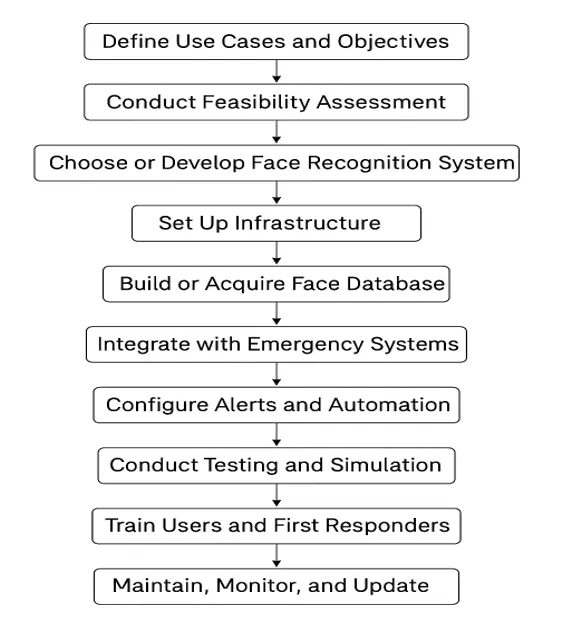
How to Implement Face Recognition in This Context
1. Define Use Cases and Objectives
i. Real-time headcounts during evacuation
ii. Entry/exit tracking at safe zones
iii. Detect missing persons
iv. Restrict access to secure areas during emergencies
v. Improve post-event analytics and recovery
2. Conduct Feasibility Assessment
i. Assess physical infrastructure (CCTV, power, internet)
ii. Evaluate legal frameworks (GDPR, biometric laws)
iii. Identify budget constraints
iv. Analyze demographics and operational complexity
Checklist:
i. Power backup and uninterrupted network
ii. Legal compliance and data protection policies
iii. Internal stakeholder buy-in
3. Choose or Develop a Face Recognition System
i. Commercial APIs: AWS Rekognition, Azure Face API, Face++
ii. Open-Source: OpenCV, FaceNet, Dlib, DeepFace
For schools, workplaces, and community centres, implementing an evacuation plan and emergency preparedness will help create a culture of safety and preparedness. Regular training sessions can educate everyone on their roles during an emergency, allowing for a seamless implementation of the evacuation plan and emergency preparedness procedures.
iii. Hardware-integrated solutions: Hikvision, Dahua, etc.
Recommendation: Use open-source libraries for flexibility if local processing is needed. Use commercial APIs for faster deployment.
4. Set Up Infrastructure
Hardware Requirements:
i. High-resolution IP cameras
ii. Edge devices or dedicated servers (if offline processing)
iii. UPS backup for emergency situations
Software Requirements:
i. Facial recognition application (custom or platform-based)
ii. Admin dashboard to monitor entry/exit
iii. Integration with alert systems
5. Build or Acquire a Face Database
i. Capture high-quality facial images of all individuals
ii. Tag metadata (name, ID, contact, priority level)
iii. Encrypt and securely store data
Consent and Privacy:
i. Collect written/digital consent from all subjects
ii. Provide opt-out options and explain data usage
6. Integrate with Emergency Systems
Link face recognition with:
i. Emergency alert software
ii. Public address systems
iii. Fire alarms and access control
iv. SMS/email notification services
v. Enable automatic alerting when a known person fails to exit
7. Configure Alerts and Automation
Examples:
i. Alert if someone is still inside 5 mins after evacuation begins
ii. SMS to safety manager if high-priority individuals are missing
iii. Real-time logs of each face detected at exit/entry
Integration Points:
i. Notification tools (Twilio, Firebase, Email)
ii. Emergency dashboards
8. Conduct Testing and Simulation
Test Cases:
i. Fire drill during daylight and night
ii. People with masks/hats
iii. Elderly and disabled evacuation tracking
Metrics:
i. Detection accuracy
ii. Response time
iii. Alert delay
iv. False positive/negative rates
9. Train Staff and First Responders
Training Topics:
i. Using face recognition systems during drills
ii. Understanding alerts and responding properly
iii. Manual override options
iv. Ensuring ethical and secure use
Include:
i. SOP manuals
ii. Hands-on workshops
iii. Mock drill integration
10. Maintain, Monitor, and Update
Routine Tasks:
i. Weekly log and footage checks
ii. Quarterly facial data updates
iii. Biannual training refreshers
iv. Patch management and software updates
Reports:
i. Evacuation compliance summary
ii. Face-based audit trails
iii. Post-event efficiency reports
Combined Technologies for Enhanced Impact
Face recognition can be even more powerful when combined with:
- AI + CCTV Surveillance
- Thermal Cameras (detect people through smoke/fire)
- IoT Sensors (detect temperature, motion, gas leaks)
- Drone Surveillance (for face tracking in large outdoor emergencies)
Tools & Technologies
- Face Recognition Libraries: OpenCV, FaceNet, DeepFace, AWS Rekognition, Microsoft Azure Face API.
- Integration Platforms: Custom apps or third-party platforms like Genetec, Milestone Systems, etc.
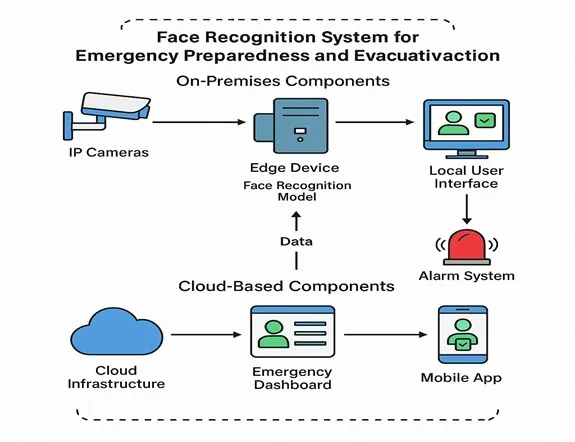
Flow of Data
- Video from cameras flows to the edge device for face recognition.
- Identified data is used to update the dashboard and alert systems.
- Cloud ensures remote access and long-term analytics.
- Mobile and local interfaces support decision-making and real-time actions.
How Simbi Labs Can Help with Your Emergency Planning
Creating a strong evacuation and emergency response system isn’t just about having the right equipment—it’s about planning, coordination, and making sure the system works when it matters most. Simbi Labs works closely with schools, offices, hospitals, and factories to build custom solutions that actually fit their needs.
What We Do:
- Review Your Current Setup
We take a close look at your existing safety plans and point out areas that can be made stronger or more efficient. - Help You Choose the Right Tools
If you’re thinking about using facial recognition for headcounts or access control, we guide you in picking tools that match your goals and your budget. - Assist with Installation & Setup
From camera placement to system connection, our team makes sure everything is installed correctly and works smoothly. - Train Your Team
We don’t just set things up and walk away. We make sure your staff knows how to use the tools during drills and real emergencies. - Keep You Legal and Safe
We advise you on how to handle facial data securely and in line with local privacy laws.
Conclusion
A well-structured evacuation plan and robust emergency preparedness system are critical for minimizing risk, saving lives, and ensuring swift, organized responses during crises. Together, they create a safety framework that empowers individuals, enhances coordination, and reduces chaos when emergencies strike. Investing in planning, training, and technology today ensures a more resilient and protected tomorrow.
For an in-depth understanding, please refer to our book, “Academic Research Fundamentals: Research Writing and Data Analysis”. It is available as an eBook here, or you may purchase the hardcopy here .
In summary, a well-structured evacuation plan and robust emergency preparedness system are critical for minimising risk, saving lives, and ensuring swift, organised responses during crises. Together, they create a safety framework that empowers individuals, enhances coordination, and reduces chaos when emergencies strike. Investing in planning, training, and technology today ensures a more resilient and protected tomorrow, making the evacuation plan and emergency preparedness a priority in every organisation.