
Power Analysis for Pearson Correlation in SPSS
Introduction
Statistical power analysis is an essential step in research design. It allows you to determine the probability of detecting a real relationship between variables or to estimate the sample size needed to achieve a desired level of power. Performing a power analysis before starting your study can save time, money, and effort, while also helping to avoid inconclusive results.
While many power analyses focus on means or proportions, there are many situations where the relationship between two variables is the main focus — for example, the link between study time and exam scores, age and blood pressure, or training hours and job performance. In such cases, correlation is the most appropriate statistical tool.
SPSS offers two main correlation-based power analysis options:
1. Pearson Product Moment Correlation — used when both variables are continuous and the relationship is linear, such as hours studied and percentage score.
2. Spearman Rank Order Correlation — used when data are ordinal, not normally distributed, or the relationship is monotonic but not necessarily linear, such as customer satisfaction ranks and repeat purchase frequency.
In this blog, we will walk through how to perform Estimate Power analysis for both Pearson and Spearman correlation in SPSS, explain each input in the dialog box, and demonstrate the interpretation using hypothetical datasets.
Read Also : How to Perform Power Analysis for Means in SPSS: Step-by-Step Guide with Examples
A. What is Pearson Correlation – Power Analysis in SPSS?
Purpose of the Test
The Pearson correlation measures the strength and direction of a linear relationship between two continuous variables. Power analysis for Pearson correlation tells you the probability of correctly rejecting the null hypothesis (that there is no correlation) given your sample size, observed correlation, significance level, and test direction.
Example:
A researcher wants to know if hours of training are related to employee performance scores.
They collect data from 30 employees, measuring both variables. The Pearson correlation between hours of training and performance score is 0.45.
What is the Goal of the Analysis?
Power Analysis Goal: Assess whether the current sample size of 30 is large enough to reliably detect a correlation of –0.20585441
at the 5% significance level.
Hypothetical Dataset:
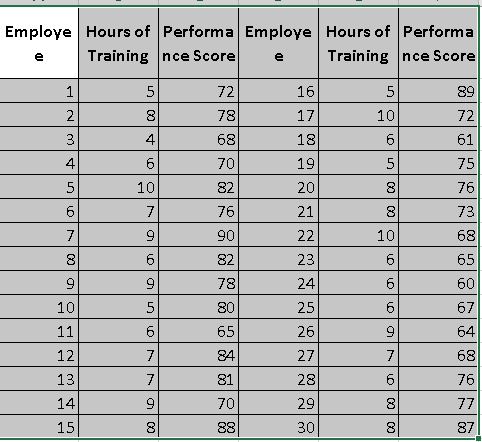
Summary Statistics:
i. Pearson correlation (r): 0.45
ii. Sample size (n): 30
iii. Null value: 0 (no correlation)
iv. Significance Level: α = 0.05
Hypothesis:
i. H₀: ρ = 0 (no correlation between hours of training and performance scores)
ii. H₁: ρ ≠ 0 (there is a significant correlation)
What are the Steps in SPSS?
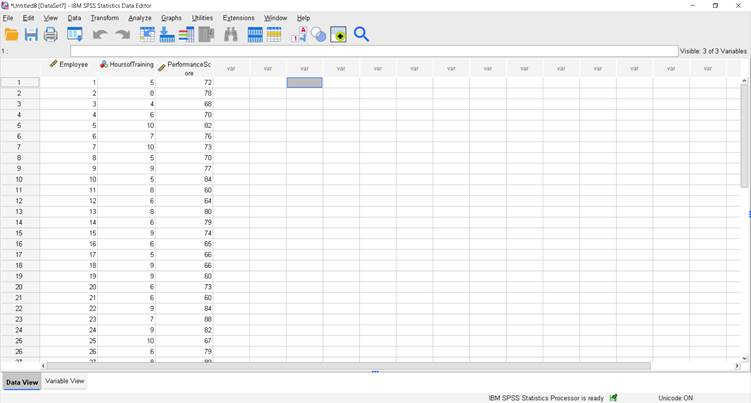
Step 1 – Open the Power Analysis Window
In SPSS, go to:
Analyze > Power Analysis > Correlation > Pearson Product Moment
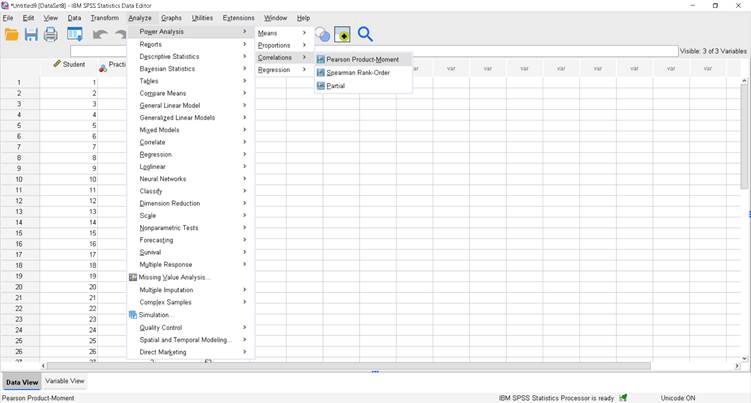
Step 2 – Enter Values for Achieved Power
Since we want to calculate the achieved power for our existing dataset:
i. Select: Estimate power
ii. Sample size in pairs: 30
iii. Pearson correlation parameter: 0.45
iv. Null value: 0
v. Use bias-correction formula in the power estimation: Checked
vi. Test Direction: Nondirectional (two-sided)
vii. Significance level: 0.05

Step 3 – Run the Analysis
Click OK.
How to Write Interpretation for a Pearson Correlation – Power Analysis in SPSS?
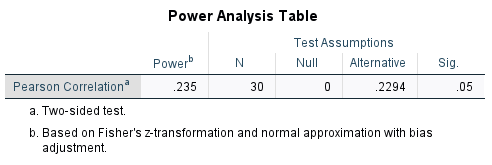
The analysis estimates the achieved power for detecting a correlation.
With a sample size of 30, the null hypothesis assumes no correlation (ρ = 0), while the alternative assumes ρ = 0.2294.
The achieved power is only 0.235 (23.5%), meaning the chance of correctly rejecting the null if the alternative is true is low.
This falls far below the recommended 80% power, indicating the study is underpowered for detecting such a small correlation.
Read Also : Power Analysis for Partial Correlation in SPSS
B. What is Spearman Rank-Order – Power Analysis in SPSS?
Purpose of the Test
Spearman’s ρₛ measures the strength and direction of a monotonic relationship between two variables using their ranks.
Power analysis for Spearman tells you the chance of correctly rejecting H₀: ρₛ = 0 given:
i. your sample size (pairs),
ii. an assumed/observed ρₛ,
iii. α (significance level), and
iv. two-tailed vs one-tailed test.
Example
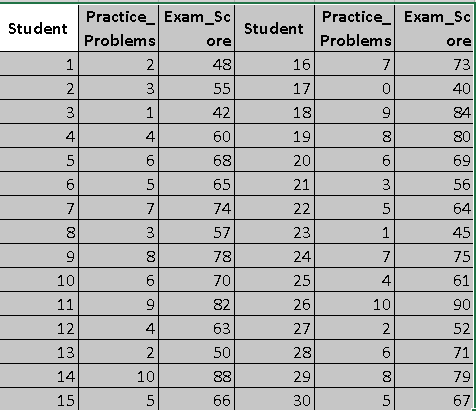
A researcher studies whether Practice Problems Completed per week relates to Exam Score in a way that might be monotonic but not perfectly linear (some students cram, some plateau). She has n = 30 students.
What is the goal of the analysis?
Power Analysis Goal: With n = 30, assess whether the study is adequately powered to detect a moderate monotonic association (assume ρₛ = 0.40) at α = .05 (two-tailed).
Hypotheses
i. Null hypothesis (H₀): There is no relationship between the two variables in the population.
ii. Alternative hypothesis (H₁): There is a relationship between the two variables in the population.
iii. Significance level (α): 0.05 (This means you’re willing to accept a 5% chance of concluding there is a relationship when in fact there isn’t.)
Hypothetical Dataset:
Summary Statistics:
i. Spearmen correlation (R): 0.995
ii. Sample size (n): 30
iii. Null value: 0 (no correlation)
iv. Significance Level: α = 0.05
What are steps in SPSS?
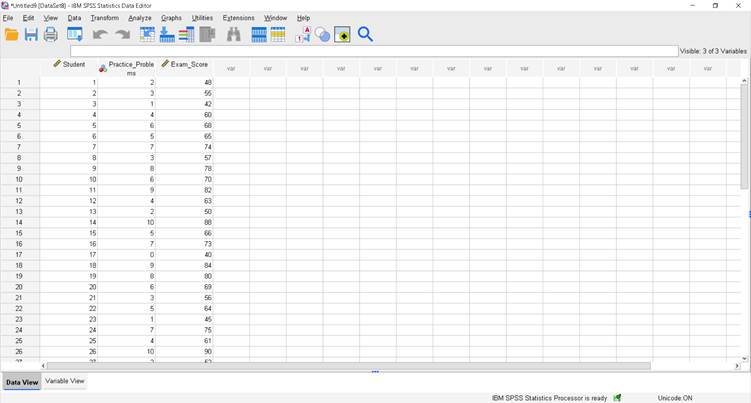
Step 1 – Open the Power Analysis Window
Analyze > Power Analysis > Correlation > Spearman Rank Order
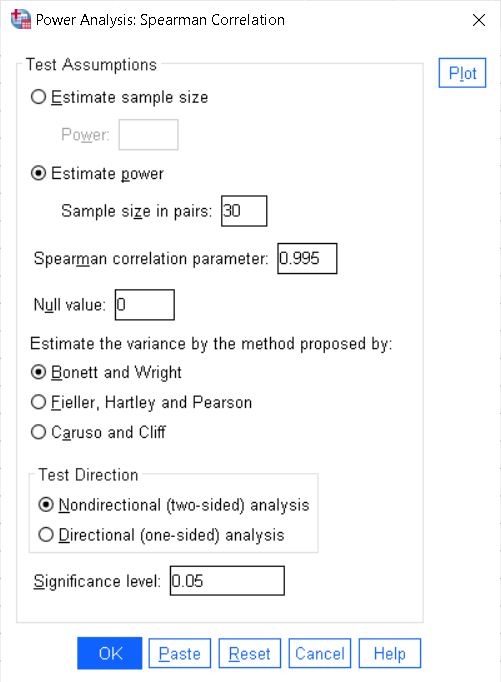
Step 2 – Enter Values for Achieved Power
Since we’re estimating power with existing/assumed values:
i. Select: Estimate power
ii. Sample size in pairs: 30
iii. Spearman correlation parameter (ρₛ): 0.995 (use the value you computed or wish to detect)
iv. Null value: 0 (means the null hypothesis assumes no monotonic relationship between the two variables)
v. Test Direction: Nondirectional (two-sided) (choose one-sided only with a justified directional hypothesis)
vi. Significance level: 0.05
vii. (If the dialog offers a bias-correction/normal-approximation option, keep it checked — it improves large-sample accuracy.)
Step 3 – Run the Analysis
Click OK.
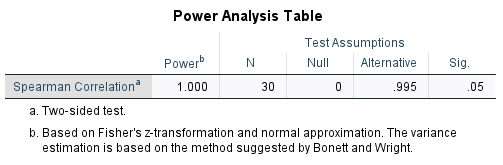
How to write the interpretation for a Spearman Power Analysis in SPSS?
The power analysis shows a power of 1.000, meaning there is essentially a 100% chance of detecting the true effect if it exists.
With 30 paired observations, the null hypothesis assumes no monotonic association (ρₛ = 0), while the observed correlation is extremely high (ρₛ = 0.995).
The test is two-sided at a 5% significance level (α = 0.05), checking for both positive and negative associations.
Variance estimation follows the Bonett and Wright method, which is well-suited for small-to-moderate samples in Spearman correlation power analysis.
For an in-depth understanding, please refer to our book, “Academic Research Fundamentals: Research Writing and Data Analysis”. It is available as an eBook here, or you may purchase the hardcopy here .