
Top Statistical Data Analysis Tools in 2026: A Technical Guide for Data Professionals

The application of modern statistical analysis goes far beyond calculating averages, percentages, correlation, and p-values. Longitudinal observations, panel data, clinical and experimental data, high-dimensional variables and hierarchical structures are used by researchers and data professionals more and more. With increasingly complex analytical needs, the choice of the statistical data analysis tools is related more to methodology than software choice.
The analytical environment should be able to accommodate the entire process, from data preparation to exploratory analysis, model estimation, diagnostics, model validation, interpretation, and reporting. Basic statistical testing may not always be suitable for survival analysis, repeated-measures modelling and predictive analytics or automated analytical pipelines.
From Raw Data to Statistical Evidence
Every statistical workflow starts with an understanding of the dataset’s structure and quality, then determines the analytical method. It is important to the analyst to decide if the observations are cross sectional, panel, hierarchical, experimental, or time dependent.
Figure 1. Statistical Data Analysis Workflow: From Raw Data to Validated Results
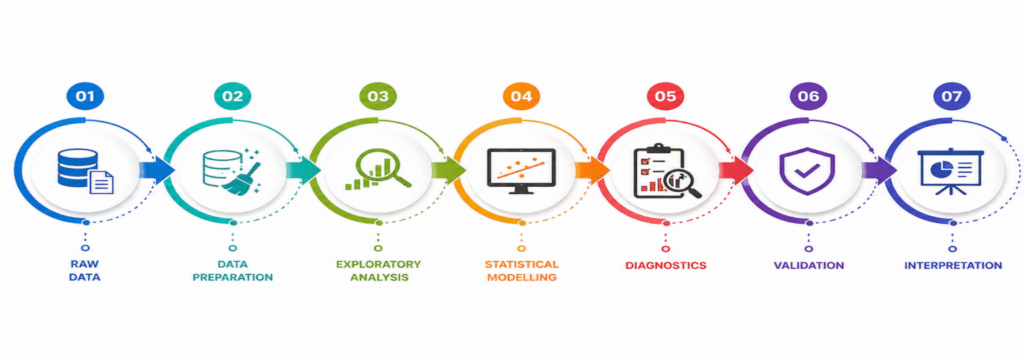
The analytical process moves on to data validation, exploratory analysis, model selection, estimation, diagnostics, model validation and interpretation. This is particularly relevant due to the fact that the methodology should be supported by the statistical software, and not the other way round. The inappropriate research design or the mis-specified model cannot be overcome by any sophisticated software.
Match the Statistical Tool to the Data Architecture
When choosing the statistical analysis software, one of the most essential factors is to consider the structure of the dataset. Cross-sectional survey data can sometimes be analyzed using descriptive statistics, hypothesis testing, factor analysis and regression analysis; while longitudinal data can be analyzed with methods that take into account repeated observations and within-subject correlation.
Another level of complexity is added to hierarchical datasets. For instance, patients could be segmented in a hospital, students in a school, or employees in an organisation. These are some of the reasons why multi-level or mixed-effects models might be necessary for such structures. Time-series data may have temporal dependence, time-series autocorrelation, trends and seasonality, and high-dimensional data might need dimensionality reduction, feature selection or regularisation.
So, the best tool is one that is able to model the statistical structure of the data, not just provide the greatest number of menu-based tests.
Statistical Modelling Beyond Basic Tests
Modern statistical data analysis tools should be evaluated according to the depth of modelling they support. Routine analyses may involve t-tests, chi-square tests, correlation, and ANOVA, but technically demanding projects can require considerably more advanced procedures.
Key analytical requirements may include:
- Inferential modelling – hypothesis testing, confidence intervals, ANOVA and regression.
- Predictive modelling – classification, prediction and model-based forecasting.
- Multivariate analysis – factor analysis, PCA, clustering and discriminant analysis.
- Complex-data modelling – survival, longitudinal, repeated-measures and mixed-effects analysis.
- Time-series analysis – trend, seasonality, autocorrelation and forecasting.
- Machine learning – classification, regression, clustering and feature engineering.
The appropriate platform should therefore be selected according to whether the primary objective is inference, explanation, prediction, classification, forecasting, or exploratory discovery.
Model Diagnostics: Testing Whether the Model Can Be Trusted
Creating a statistical model is just one aspect of a thorough analysis. Even with significant coefficients, a regression model may be poorly specified or fail to meet important assumptions.
Residual behaviour, multicollinearity, heteroscedasticity, influential observations, goodness of fit, independence, distributional assumptions and model specification (if applicable) should be explored in a strong analytical process. To make sure predictive models work well for observations not used in creating the model, they need more testing.
Diagnostic ability is one of the key factors to consider when assessing statistical software. A useful platform is not just to produce a result but should also offer adequate analytical tools to examine the statistical defensibility of that result.
Reproducibility: Building Analysis That Can Be Repeated
Reproducibility is particularly important in academic research, clinical analysis, scientific studies, and enterprise analytics. A workflow based entirely on manual selections and exported outputs can become difficult to repeat when the dataset is updated.
A reproducible workflow instead follows a documented analytical sequence:
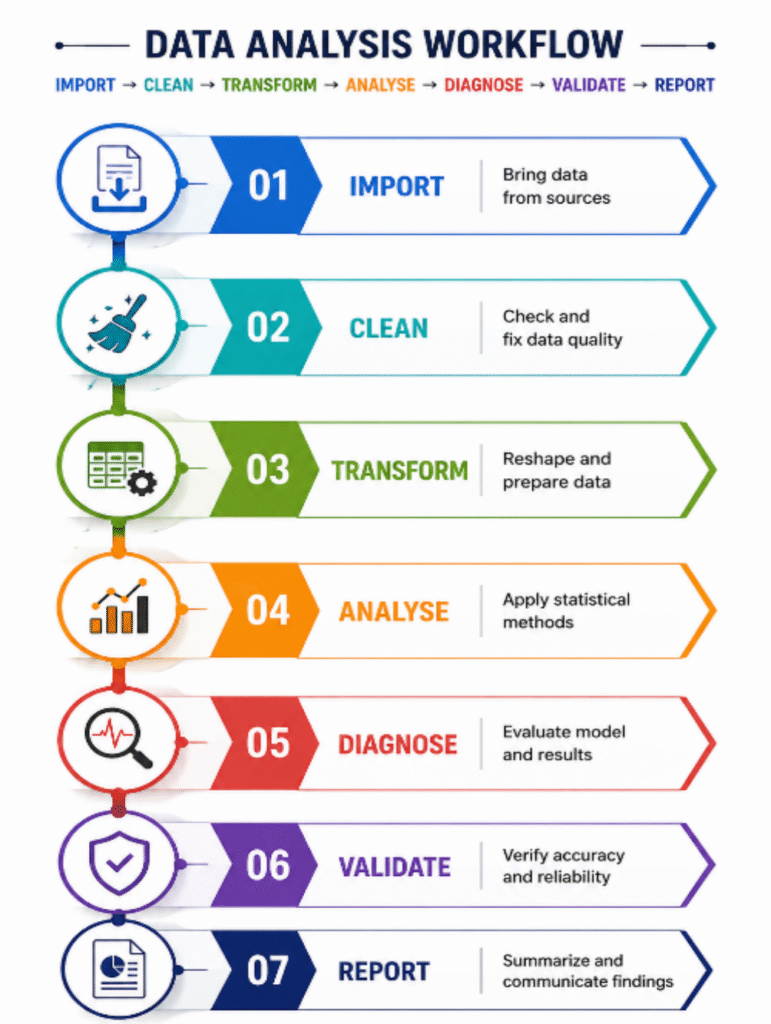
Syntax, scripts, project files, automated reporting, and version-controlled workflows allow analysts to repeat the same procedures when new observations become available. They also make analytical decisions easier to audit because the transformations, models, and reporting steps can be reviewed systematically.
Table 1. Technical Comparison of Leading Statistical Data Analysis Tools
| Tool | Core Strength | Advanced Applications | Best Suited For |
| SPSS | Applied statistical analysis | Regression, ANOVA, factor analysis, survey analysis | Researchers, healthcare and social sciences |
| R | Statistical computing | Multivariate modelling, specialised statistics, machine learning | Statisticians and researchers |
| Python | Programmable analytics | Predictive modelling, machine learning, automation | Data scientists and analysts |
| SAS | Enterprise analytics | Clinical, risk and large-scale statistical modelling | Large organisations |
| Stata | Econometric analysis | Panel, causal, survival and longitudinal analysis | Economists and researchers |
| Minitab | Quality statistics | DOE, process capability and control charts | Manufacturing and Six Sigma |
| JMP | Interactive statistical discovery | DOE, predictive modelling and exploratory analysis | Engineers and researchers |
| Excel | Spreadsheet analysis | Descriptive statistics and basic regression | Small datasets and business users |
| MATLAB | Numerical analysis | Simulation, optimisation and machine learning | Engineers and scientists |
| GraphPad Prism | Biomedical statistics | Nonlinear modelling, survival analysis and scientific graphics | Life-science researchers |
When Point-and-Click Analysis Stops Being Enough
For standardised analytical procedures, graphical statistical platforms can be very useful, especially if researchers require some pre-programmed methods. In more complex projects, however, custom transformations, automated model execution, database integration, large scale preprocessing, machine-learning pipelines, or repeated analysis might be needed.
This is where programmable environments like R and Python can be of great value. They can be programmed in such a way so that analysts can create reusable workflows instead of having to repeat the same operations manually. Structured analytical workflows are also supported in syntax-driven environments, like Stata and SAS.
The selection of a graphical or programmable environment should thus depend on workflow complexity, level of automation, data size, repeatability and proficiency of the analysts.
Selecting the Platform According to the Analytical Problem
Software selection becomes more meaningful when it is connected to a specific analytical requirement rather than software popularity. A questionnaire researcher, clinical statistician, manufacturing engineer, and machine-learning professional may all require completely different statistical environments.
Table 2. Statistical Tool Selection by Analytical Scenario
| Analytical Scenario | Suitable Tools | Primary Analytical Requirement |
| Questionnaire and survey analysis | SPSS, R | Inferential and multivariate analysis |
| Factor and reliability analysis | SPSS, R | Psychometric modelling |
| Econometric and panel analysis | Stata, R | Longitudinal and econometric modelling |
| Clinical research | SAS, SPSS, R, Prism | Statistical and biomedical analysis |
| Industrial quality analysis | Minitab, JMP | Process control and experimental design |
| Predictive modelling | Python, R, SAS | Statistical and machine-learning workflows |
| Engineering analysis | MATLAB, Python | Numerical modelling and simulation |
| Reproducible research | R, Python, Stata, SAS | Script-based analytical workflows |
| Quick business analysis | Excel, SPSS | Accessible statistical reporting |
The distinction is important because the “best” platform changes with the analytical problem. For example, econometric modelling may prioritise panel-data and causal-analysis capabilities, whereas an industrial project may require design of experiments, process capability, and statistical process control.
Beyond Licence Price: Evaluating the Total Analytical Cost
Software selection should not be based only on licence price. The actual cost can include training, implementation, integration, maintenance, workflow development, scalability, technical support, and analyst productivity.
A low-cost platform might prove to be inefficiently used if the data needs to be manually prepared multiple times for analysis or the same analysis is repeated. On the other hand, if the project demands simple statistical analyses, it might not be worth having a very sophisticated platform. Before any organisation decides on a platform as a standard, they should take into account the licensing, training, scalability of the platform, automation, integration, support, and long-term workflow needs.
The Best Statistical Platform Depends on the Analytical Problem
There is no universally superior statistical software. While SPSS is useful for applied research and survey analysis, R is useful for statistical computing in general, and Python is particularly useful when statistical modelling is integrated with machine learning and automation. SAS is appropriate for structured enterprise applications; Stata, for econometric and longitudinal studies; Minitab, for industrial quality applications; JMP, for interactive statistical discovery; GraphPad Prism, for biomedical research; and MATLAB, for engineering and numerical applications.
The most suitable statistical data analysis tools are, therefore, dependent upon the data, research design, modelling needs, diagnostic needs, technical skills and reporting context.
Best data analysis tools are not those that are most popular, but those that can handle the data set, statistical methodology, modelling needs, diagnostics and reporting needs. The choice of the platform allows you to make the statistical analysis more accurate, reproducible and methodologically correct for the purpose of research or business goals.
For an in-depth understanding, please refer to our book, “Academic Research Fundamentals: Research Writing and Data Analysis”. It is available as an eBook here, or you may purchase the hardcopy here .