
Top 10 Common Crowd Management Mistakes That Lead to Congestion
From music festivals and sports stadiums to religious gatherings, exhibitions, shopping malls, airports, and conferences, managing large crowds has become one of the biggest challenges for event organizers. While successful events are often remembered for entertainment, networking, or memorable experiences, poor crowd management can quickly turn an enjoyable gathering into a stressful or even dangerous situation.
Most crowd-related incidents do not occur because too many people attend an event—they occur because of poor planning. Congestion at entrances, blocked exits, confusing layouts, inadequate signage, and ineffective queue management are often preventable issues that arise from common planning mistakes.
Fortunately, modern crowd management combines data-driven planning, crowd simulation, AI-powered monitoring, and operational best practices to identify risks before an event begins.
This article explores the ten most common crowd management mistakes that lead to crowd congestion and practical strategies event managers can use to prevent them.
READ ALSO: Crowd Safety Audit Public Facility
Why Crowd Congestion Is a Serious Concern
Crowd congestion affects more than visitor comfort.
Excessive crowd density can result in:
- Delayed entry and exit
- Long queues
- Increased frustration
- Trip-and-fall incidents
- Reduced emergency access
- Heat stress in outdoor events
- Delayed emergency evacuation
- Increased risk of crowd crush
Even well-organized events can experience congestion if pedestrian movement has not been carefully planned.
Common Causes of Crowd Congestion
Crowd congestion usually results from multiple operational factors rather than a single issue.
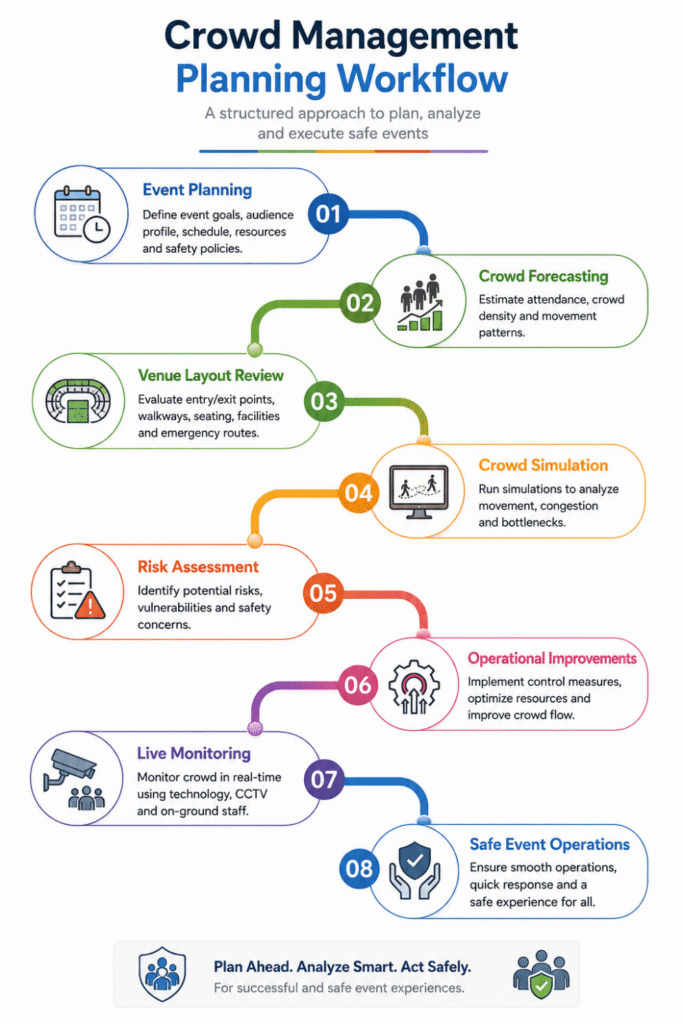
Crowd Management Planning Workflow
1. Underestimating Attendance
One of the biggest crowd management mistakes is underestimating the number of attendees. Many organizers rely only on ticket sales without considering:
- Staff
- Vendors
- Media personnel
- VIP guests
- Walk-in visitors
Solution
- Forecast attendance using historical data.
- Include all occupant categories.
- Plan for peak occupancy rather than average attendance.
2. Poor Entrance and Exit Planning
Insufficient entrances create long queues before visitors even enter the venue.
Similarly, inadequate exits slow evacuation and increase congestion after events.
Common Problems
- Too few access points
- Narrow gates
- Security checkpoints creating bottlenecks
- Poor separation between entry and exit flows
Solution
- Increase access points where feasible.
- Separate entry and exit routes.
- Simulate visitor arrival patterns before the event.
3. Ignoring Pedestrian Flow
Visitors naturally follow the shortest and most familiar routes. Without planning, intersecting pedestrian streams often create congestion.
Solution
Design one-way circulation where appropriate. Clearly separate:
- Entry flow
- Exit flow
- Service routes
- Emergency routes
4. Inadequate Queue Management
Queues often become larger than expected. Examples include:
- Food courts
- Ticket counters
- Security screening
- Restrooms
- Merchandise stalls
Solution
- Provide designated queue lanes.
- Use digital ticketing.
- Introduce timed entry slots.
- Monitor queue lengths continuously.
5. Poor Signage and Wayfinding
Confused visitors slow pedestrian movement. Missing or unclear signs increase:
- Wrong turns
- Backtracking
- Crowd clustering
Solution
Install:
- Directional signs
- Digital information boards
- Color-coded zones
- Emergency route indicators
6. Neglecting Emergency Evacuation Planning
Many organizers focus only on normal operations. Emergency situations require entirely different movement patterns.
Solution
Develop evacuation plans covering:
- Fire
- Medical emergencies
- Severe weather
- Security threats
- Power failures
7. Not Using Crowd Simulation
One of the most avoidable crowd management mistakes is relying solely on experience instead of testing the venue layout. Crowd simulation enables organizers to evaluate:
- Peak-hour congestion
- Queue formation
- Entry and exit capacity
- Emergency evacuation
- Staff deployment
Solution
Run multiple “what-if” scenarios before finalizing the event plan.
8. Insufficient Staff Deployment
Even well-designed venues require trained personnel. Common staffing issues include:
- Too few stewards
- Poor communication
- Lack of crowd monitoring
- Inadequate emergency training
Solution
Deploy staff strategically at:
- Entrances
- Exits
- Queue areas
- High-density zones
- Emergency routes
9. Poor Venue Layout
Temporary event layouts often create unnecessary bottlenecks. Examples include:
- Food stalls blocking walkways
- Merchandise kiosks near exits
- Narrow corridors
- Poor seating arrangements
Solution
Review layouts using pedestrian simulations before installation. Maintain clear walking corridors throughout the venue.
10. Lack of Real-Time Monitoring
Crowd conditions constantly change. Without live monitoring, organizers may react too late.
Solution
Use:
- CCTV
- AI video analytics
- Occupancy sensors
- Mobile communication systems
- Event control dashboards
These technologies allow rapid operational adjustments.
Summary of Common Mistakes and Solutions
| Crowd Management Mistake | Impact | Recommended Solution |
| Underestimating attendance | Overcrowding | Accurate forecasting |
| Poor entrance planning | Long queues | Multiple access points |
| Ignoring pedestrian flow | Congestion | One-way circulation |
| Weak queue management | Delays | Queue barriers and timed entry |
| Poor signage | Confusion | Clear wayfinding system |
| Limited evacuation planning | Safety risks | Comprehensive emergency plans |
| No crowd simulation | Design errors | Test layouts before events |
| Inadequate staffing | Slow response | Strategic staff deployment |
| Poor venue layout | Bottlenecks | Optimize layout design |
| No real-time monitoring | Delayed interventions | AI monitoring and CCTV |
Technologies and Software Used
Modern event management increasingly relies on technology to prevent crowd congestion.
| Software / Technology | Primary Purpose | Typical Users |
| GAMA Platform | Agent-based crowd behavior simulation | Crowd Management Consultants |
| NetLogo | Behavioral crowd modeling | Universities & Researchers |
| Pathfinder | Occupant movement and evacuation analysis | Fire Engineers |
| MassMotion | High-density pedestrian simulation | Event Planners |
| AnyLogic | Multi-method event simulation | Smart Venue Consultants |
| Legion | Crowd flow optimization | Stadium & Airport Designers |
| QGIS / ArcGIS | Spatial crowd mapping | Urban Planners |
| Autodesk Revit (BIM) | Venue modeling | Architects |
| AI Video Analytics | Real-time crowd monitoring | Security Teams |
| IoT Occupancy Sensors | Live crowd counting | Smart Venues |
How These Technologies Improve Event Planning
Simulation software such as MassMotion, Pathfinder, GAMA Platform, and NetLogo allows organizers to model attendee movement before an event takes place. By importing venue layouts from Revit or CAD systems, planners can identify congestion hotspots, optimize entrance locations, evaluate queue management strategies, and test emergency evacuation scenarios. During live events, AI-powered CCTV analytics and IoT occupancy sensors provide real-time data that enables control rooms to respond quickly to changing crowd conditions.
Real-World Case Study: Managing Crowd Flow at the London 2012 Olympic Games
The London 2012 Olympic Games welcomed millions of spectators across multiple venues over several weeks, making crowd movement one of the largest operational challenges of the event.
Challenge
Organizers needed to manage:
- Large volumes of spectators arriving within short time windows
- Multiple venue entrances
- Public transportation connections
- Security screening queues
- Safe evacuation capability
Solution
The organizing committee combined detailed pedestrian modeling with operational planning. Advanced crowd simulation software was used to test venue layouts, estimate walking times, optimize security checkpoint locations, and evaluate emergency evacuation procedures. During the Games, real-time CCTV monitoring, transport data, and coordinated control rooms continuously monitored crowd conditions.
Results
The integrated planning approach helped minimize congestion across Olympic venues despite record attendance. Entry procedures remained orderly, pedestrian circulation was optimized, and transportation hubs handled high passenger volumes efficiently. The event is widely recognized as an example of how simulation-supported planning and real-time monitoring can enhance crowd safety at large-scale international events.
Best Practices for Event Managers
To minimize crowd congestion, event managers should:
- Begin crowd planning early in the project lifecycle.
- Estimate attendance conservatively using historical data.
- Conduct a professional crowd risk assessment.
- Test venue layouts using simulation software.
- Clearly separate pedestrian movement routes.
- Develop detailed emergency evacuation procedures.
- Train staff in crowd management protocols.
- Monitor crowd density continuously during the event.
- Coordinate with emergency services and local authorities.
- Review lessons learned after every event.
Future Trends in Crowd Management
Emerging technologies are transforming how events are planned and managed. Future innovations include:
- AI-powered crowd density prediction
- Digital twins of event venues
- Autonomous drone-based crowd monitoring
- Wearable visitor tracking (privacy-compliant)
- Smart navigation through mobile event apps
- Machine learning for congestion forecasting
- Real-time decision-support dashboards
These advancements will enable event organizers to make faster, data-driven decisions while improving visitor safety and operational efficiency.
Conclusion
Most crowd management mistakes that lead to crowd congestion are preventable with proper planning, technology, and operational discipline. From inaccurate attendance estimates and poor venue layouts to insufficient staffing and weak evacuation planning, each mistake can significantly affect visitor safety and event success.
By combining practical planning with advanced tools such as GAMA Platform, NetLogo, Pathfinder, MassMotion, AnyLogic, AI video analytics, and BIM-based venue modeling, event managers can identify risks before they occur, optimize crowd movement, and deliver safe, enjoyable experiences for every attendee.
Investing in proactive crowd management isn’t just about preventing congestion—it’s about protecting people, enhancing reputation, and ensuring every event runs smoothly from start to finish.
Book a free consultation for appointment
Email us at :grow@simbi.in