
Best Crowd Simulation Software 2026: Tools Compared
Crowd simulation has gone beyond just a bunch of people walking around a building. Pedestrian demand, individual movement, pedestrian queues, interaction, congestion, evacuation routes, and operational changes can be simulated using modern crowd simulation software, as can the interaction between pedestrians and vehicles and the interaction between pedestrians and the wider urban system, in some platforms.
Understanding Simulation Before Crowd Simulation
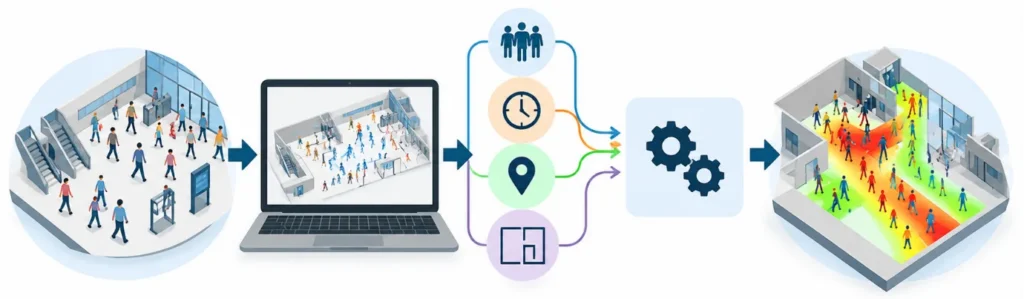
Simulation is a way of representing a real-world system as a model and then running that model to understand how the system behaves under different conditions. In simple terms, instead of changing a real system first and observing what happens, simulation allows us to create a virtual version, introduce different conditions and examine the resulting behaviour. Simulation modelling is particularly useful when real-world experimentation is costly, disruptive, risky or difficult to perform.
What a simulation actually contains
A simulation normally starts with a system, a model, inputs, rules and outputs. The system may be a manufacturing line, hospital, airport, transport network, warehouse or crowd. The model is a simplified representation of that system, while inputs describe conditions such as demand, population, arrival rates, resources or physical layout. Rules determine how the model behaves as conditions change, and the outputs show the resulting performance.
For example, in a pedestrian environment, the model may contain a building layout, a defined number of people, their destinations and movement characteristics. The simulation can then calculate how those people move through the space and where queues, congestion or changes in flow may occur.
READ ALSO : What is Crowd Simulation and Why is it Important for Public Safety?
How simulation is carried out
A basic simulation workflow can be understood as:
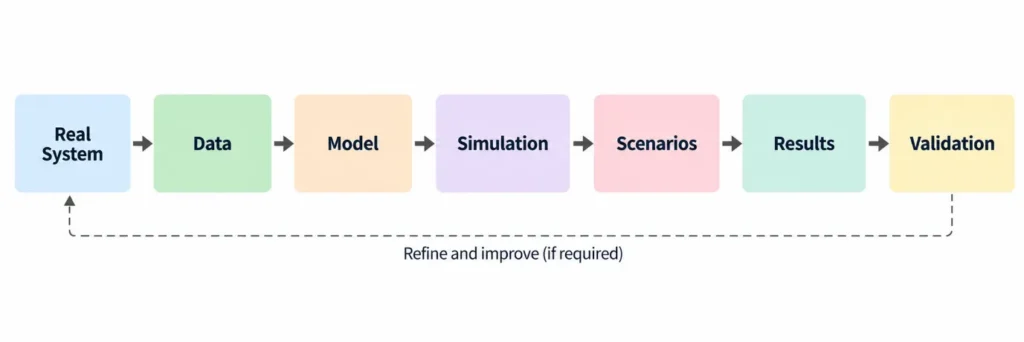
The first step is to understand the real system and collect appropriate data. The next step is to convert that information into a model. Inputs and behavioural rules are then defined, after which the model is run under one or more scenarios. Results are analysed and, where possible, compared with observed real-world behaviour to check whether the model represents the system adequately.
Simulation is therefore more than creating an animated digital environment. The underlying assumptions, input data, behavioural rules and validation process determine the usefulness of the results.
Why simulation is used
The main advantage of simulation is the ability to test “what-if” scenarios before making changes in the real world. A proposed layout, staffing arrangement, transport strategy, production process or crowd-management plan can be tested virtually, allowing different alternatives to be compared without disrupting the actual system. Discrete-event simulation, for example, is commonly used to examine processes involving time, queues, resources, variability and bottlenecks.
READ ALSO : How Crowd Simulation in Architectural Design Helps Architects During the Design Stage
Simulation has different modelling approaches
Not every simulation represents a system in the same way. Three widely used approaches are system dynamics, discrete-event simulation and agent-based modelling. System dynamics represents changes at a higher-level using relationships, stocks and flows; discrete-event simulation represents systems through events and processes occurring over time; and agent-based modelling represents individual entities and their interactions. These approaches can also be combined in hybrid models.
Where simulation is applied
Simulation is used across many sectors. Manufacturing and logistics use it to examine production, resources, warehouses and supply chains. Healthcare can use it to study patient flow and waiting times, while transport applications can examine traffic and passenger movement. Simulation is also used in business operations, service systems, urban planning and crowd analysis.
General simulation software
Different software platforms support different modelling approaches and applications. AnyLogic supports system dynamics, discrete-event and agent-based modelling, while Simul8 focuses strongly on process and discrete-event simulation but also supports agent-based, continuous and hybrid methods. Other commonly used simulation platforms include Arena, FlexSim, Simio, ProModel, ExtendSim, NetLogo and others, depending on the modelling approach and application.
The important point for a beginner is that simulation software is the tool; the model is the representation of the real system. Choosing the software therefore comes after understanding the system, the question being investigated, the type of model required and the information that needs to be produced.
READ ALSO : Railway Station Crowd Simulation for Safer Passenger Flow
Simulation begins with the model, not the software
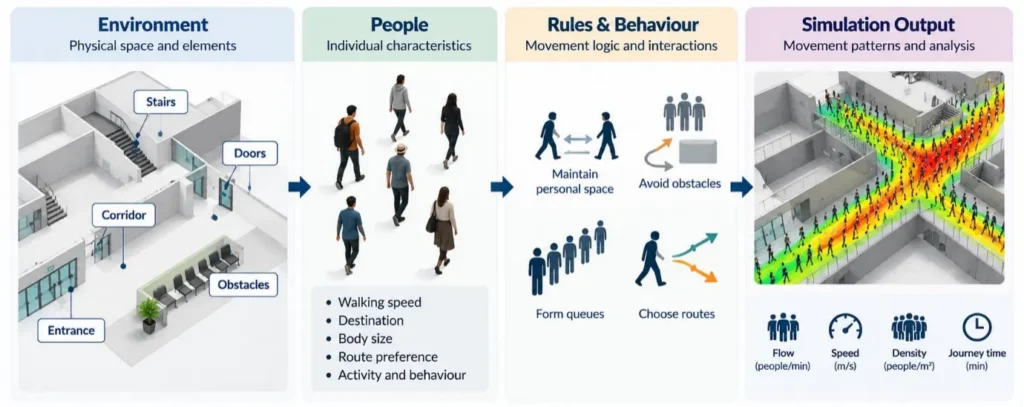
A crowd simulation model is a model that represents people, their environment and the rules that control the way they move. The model is a mixture of physical areas (corridors, stairs, entry, exit), and pedestrian attributes (speed, destination, route preference, and pedestrian behaviour)
The simulation then uses rules of movement to demonstrate the behavior of users in the presence of other users, obstacles, queuing, routes, and changing situations. Agent based, cellular automata, social force, macroscopic and hybrid approaches can be used in models, depending on the purpose of the study.
There are several modelling approaches that can be distinguished in the research literature: agent based modelling, cellular automata, social-force approaches, macroscopic flow models and hybrid approaches. Dang et al. (2024) conducted a review of dense crowd simulations including 116 articles, and identified variations in models in terms of their ability to capture behavioural representation, computational efficiency, validation and their capacity to capture emergent behaviour in high-density scenarios. (Dang et al., 2024, https://doi.org/10.1016/j.simpat.2024.102955).
The simulation engine determines how people behave
A simulation engine is the part of the model that repeatedly computes the flow of people through the model. There are different assumptions made about pedestrian behaviour based on the different engines. Some use rule-based or agent-based approaches in which individual pedestrians have attributes and decision rules.
Others apply mathematical formulations, such as pedestrian forces, navigation fields, cellular automata and flow relationships.
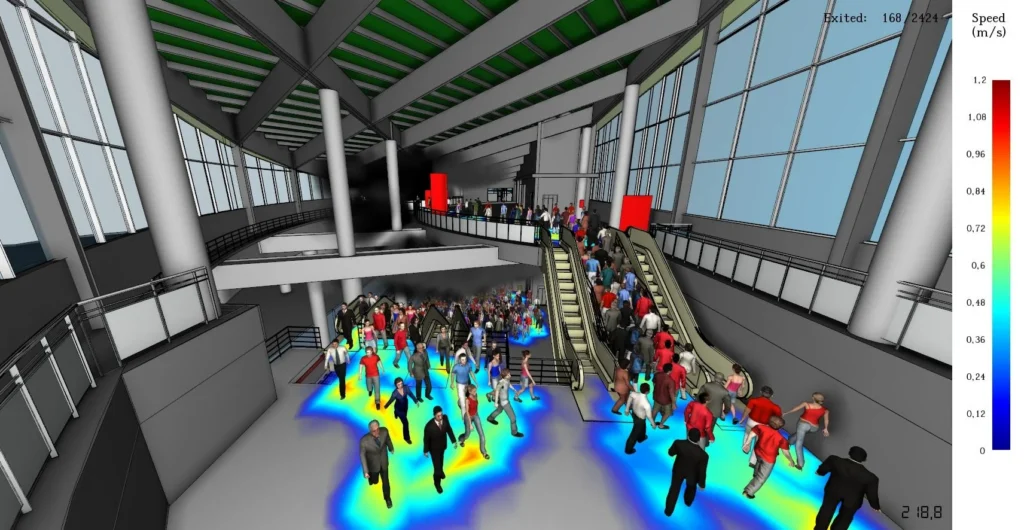
Crowd simulation showing pedestrian movement and spatial variation in flow and density.
The difference is important because if two softwares are fed the same building geometry and pedestrian demand, the results may be different if the two softwares’ behavioural assumptions and algorithms are different.
For instance, PTV Viswalk adopts a micro level approach with pedestrians and adds a Social Force Model to simulate the interactions between pedestrians. This can be used to model situations where multiple levels of movement occur, queuing systems are present, bi-directional movement is present, and there is interaction between pedestrians and modes of transport.
LEGION, on the other hand, applies a different behavioral approach: “least effort” or “least cost” pedestrian logic, and macro-navigation and micro-navigation processes are employed to compute the movement. The system is described by Bentley as modelling individual characteristics like size, speed, personal space and preferences.
This is why it’s not always easy to know if the software is being reviewed accurately just from the screen shots, animation quality or the number of simulated people shown.
The main software choices serve different modelling requirements
LEGION simulation software
LEGION simulation software, from Bentley, has a specific focus on pedestrian modelling and crowd simulation. It is especially applicable to railway stations, airports, stadiums, shopping centres, offices and other populated places.
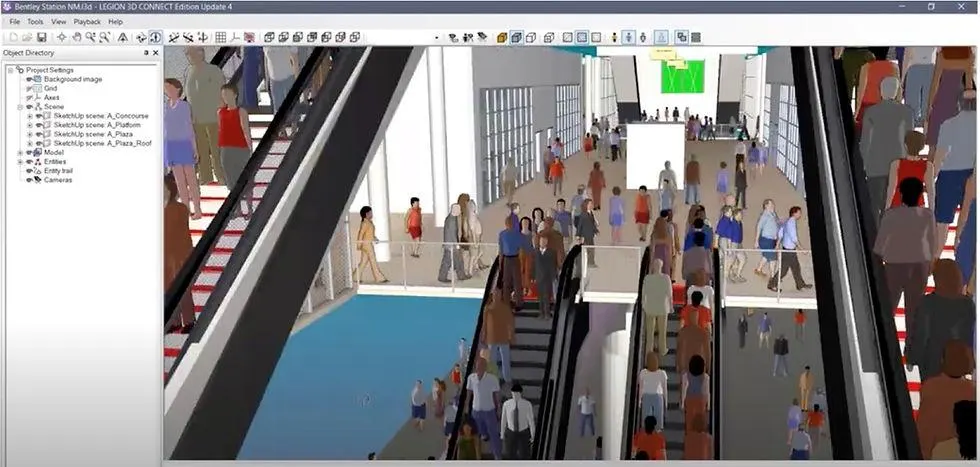
LEGION can import architectural and CAD data, specify pedestrian demand and activities, set up routes and analyse pedestrian flow, density, distance, journey time, speed and level of service, etc. It also provides evacuation scenario analysis.
It is able, therefore, to provide more detailed analysis of pedestrian movement in complex built environments, rather than general purpose simulation of all types of system.
MassMotion
Another dedicated pedestrian and crowd modelling platform is Oasys MassMotion, which focuses on human movement in physical space.
MassMotion can handle 2D and 3D geometry and provides input from a variety of formats such as IFC, DWG and FBX. It can integrate population and demographic and schedule information to create heat maps, graphs, waiting times and journey times.
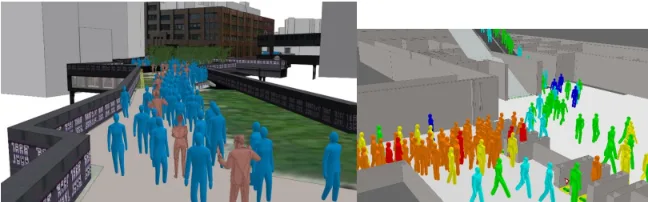
It can simulate pedestrian flow in and out of indoor and outdoor environments, and is applicable to a wide variety of fields such as queue simulation, evacuation and egress code analysis, etc.
Pathfinder
Pathfinder also offers validation tests published in Python that can be useful for technical studies that need reproducible modelling workflows.
Where life-saving performance and life-safety analysis are primary goals of the project, Pathfinder therefore plays a different role than software focusing on pedestrian circulation for daily use.
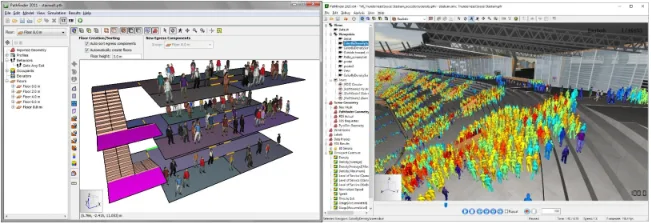
Pathfinder also provides a Python-based scripting toolkit and published validation tests, which can be valuable for technical studies requiring reproducible modelling workflows.
For projects where evacuation performance and life-safety analysis are central objectives, Pathfinder therefore occupies a different position from software primarily designed around everyday pedestrian circulation.
PTV Viswalk
PTV Viswalk is designed for microscopic pedestrian simulation and is especially useful where pedestrian movement needs to be examined alongside transportation systems.
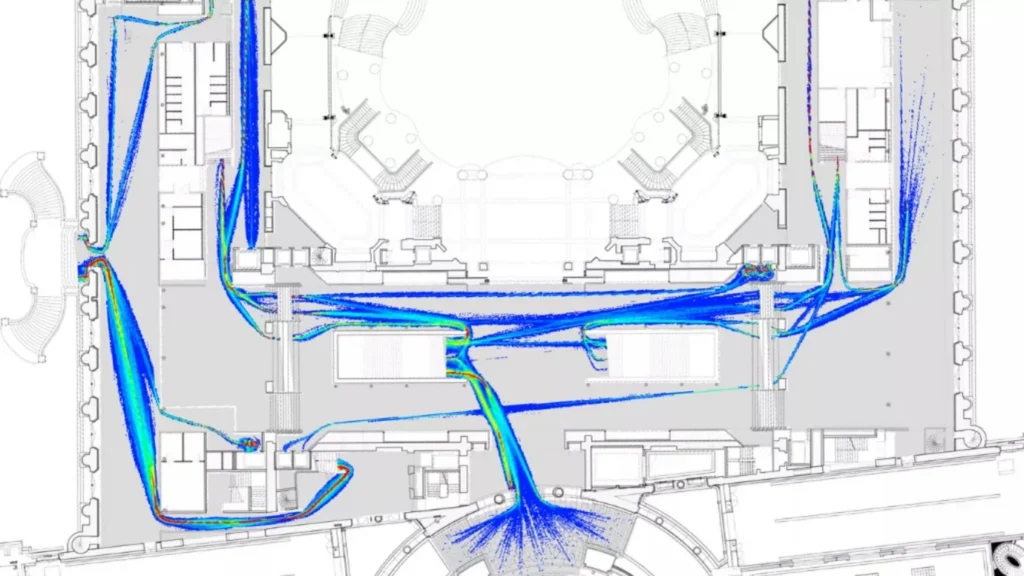
Its applications include airports, railway stations, event venues and urban environments. The platform can model queues, waiting areas, pedestrian interactions, multi-storey movement and interactions between pedestrians and vehicles, buses or cyclists. PTV states that its mass-motion capability can simulate more than one million pedestrians in a model.
This is especially applicable to projects where it is impossible to remove pedestrian movement from the larger transport system.
AnyLogic
AnyLogic has a more holistic approach. It is not only a pedestrian simulation but it is a general simulation platform which can be integrated with other modelling approaches in pedestrian, traffic, logistics, transportation and operations domains.
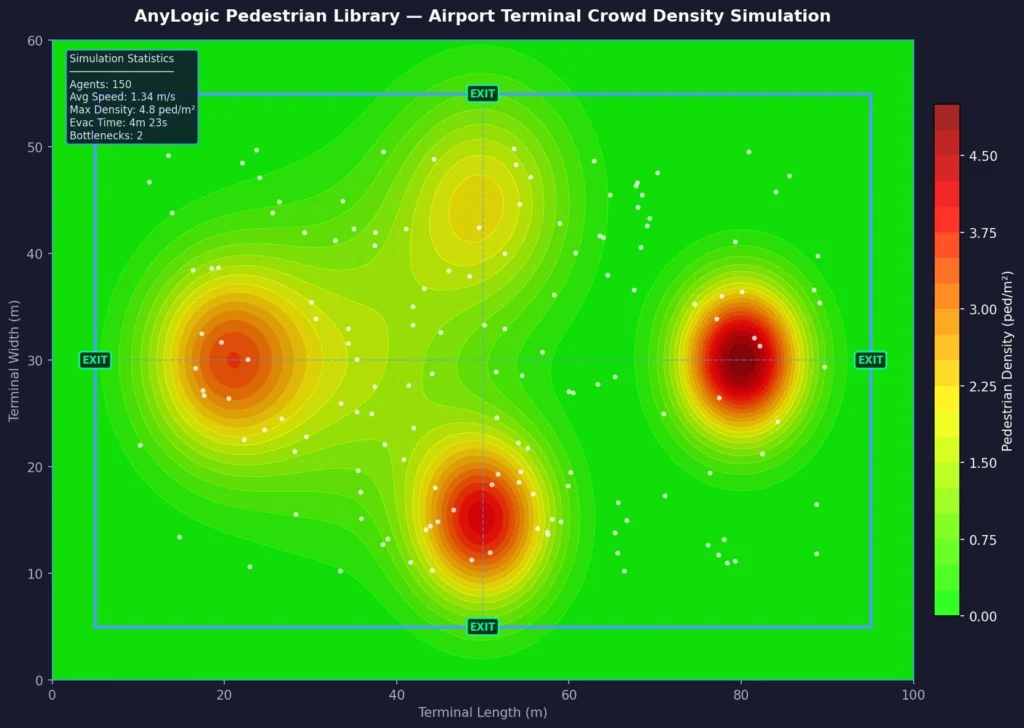
It’s Pedestrian Library can simulate movement, queues, congestion and interactions in airports, stations, retail shops, public facilities and urban spaces. Importantly, pedestrian behaviour can be linked to other system processes, enabling the user to explore the interaction between people, transport, staffing, services and operational resources.
AnyLogic is therefore especially applicable in the case when the mobility of the population is but one part of a broader model of operational or smart city.
Crowd simulation software features should be evaluated as a system
A meaningful comparison should go beyond asking which software has the most attractive visualisation.
The most important crowd simulation software features include:
| Evaluation area | Practical question |
| Geometry | Can CAD, BIM, IFC or 3D models be imported efficiently? |
| Pedestrian behaviour | How realistically are speed, personal space, route choice and interactions represented? |
| Demand | Can real population, schedule and arrival data be incorporated? |
| Navigation | Can pedestrians dynamically respond to obstacles and changing conditions? |
| Density | Can the platform handle low-, medium- and high-density conditions appropriately? |
| Evacuation | Can emergency routes, exits, threats and evacuation behaviour be represented? |
| Transport integration | Can pedestrians interact with trains, buses, vehicles or cyclists? |
| Analysis | Are density, flow, speed, travel time, queue length and bottlenecks measurable? |
| Visualisation | Can results be communicated through 2D, 3D and analytical outputs? |
| Automation | Are scripting, APIs or SDKs available for repeated scenarios? |
| Validation | Can model results be compared with observed real-world behaviour? |
| Scalability | Can the platform handle the population and spatial scale required by the project? |
Hardware becomes important as the crowd becomes larger
More than software licensing can determine simulation performance. A significant rise in computational needs can be required if there is a large number of pedestrians, detailed geometry, repeated scenarios, and high-resolution visualisation.
The difference can be demonstrated by current specifications from vendors. Bentley’s current LEGION requirements include a high-performance processor, 64 GB of RAM, a high-performance graphics card (at least 8 GB of dedicated graphics memory) and a dedicated SSD drive for operating-system and data workloads.
For simulations with very high numbers of agents being active simultaneously, more powerful hardware becomes significant, but the MassMotion user guide suggests that an Intel or AMD workstation or server class CPU with 8GB of RAM with a workstation GPU and SSD storage is recommended.
AnyLogic’s current guidelines state that for general model building, a processor with 4-8 GB RAM and 2 or more modern cores is suitable, as more cores are useful for pedestrian modelling and for multiple run experiments.
READ ALSO : Evacuation Simulation: How Engineers Predict Safe Evacuation Time
Move AI belongs to a different part of the simulation workflow
To evaluate Move AI on crowd simulation software, it is important to distinguish motion capture from the simulation engine itself.
Move AI is not just a crowd simulation platform, it’s a markerless motion-capture tech. Its technology is based on the use of several cameras and computer vision, which enables it to capture human movement and thus to produce motion data. It currently processes the images using a NVIDIA based system (Genesis) and several cameras, and is intended for in-house processing.
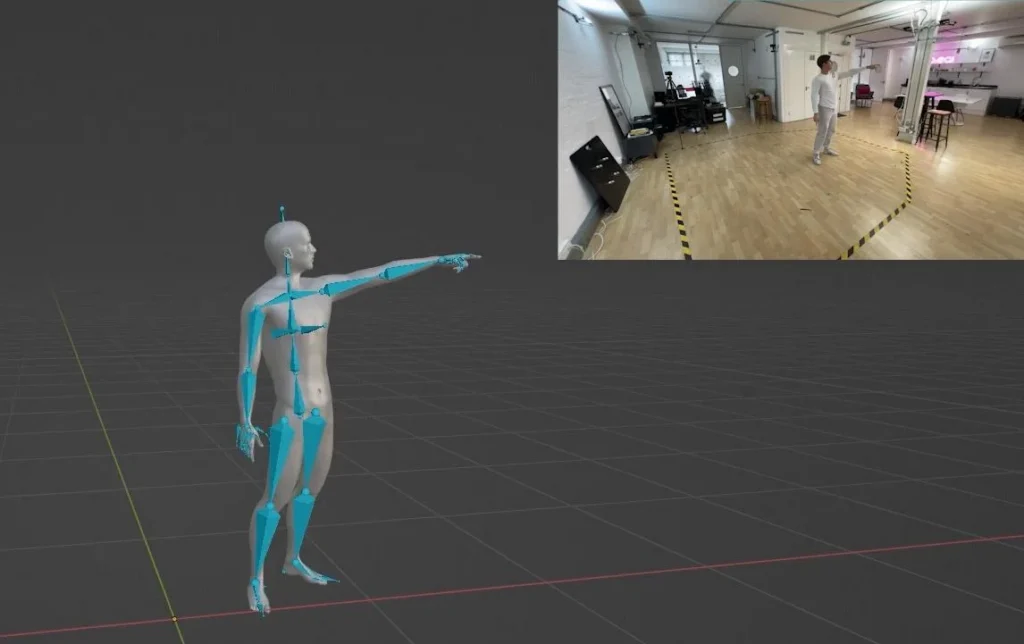
That means Move AI should not normally be compared directly with LEGION, MassMotion, Pathfinder or Viswalk as if all of them perform the same task.
Rather, motion-capture technology may be able to play an important role in an expanded simulation workflow by providing a source of observational movement data. For instance, walking patterns, walking speed or walking behaviour can be recorded to support calibration or validation procedures, depending on the research design and availability of data.
Validation separates visualisation from evidence
The final simulation should not be accepted simply because the animation looks realistic.
A believable crowd simulation involves calibration and validation, typically to the relevant evidence.
In high-density situations, crowd dynamics can become very nonlinear and validation is crucial. If a model works well at a moderate level of pedestrian interaction, it might not behave the same way if the interactions increase more significantly.
The right software depends on the decision being tested
There is therefore no single crowd simulation software that is universally appropriate for every project.
- LEGION & MassMotion — Detailed pedestrian circulation in complex-built environments.
- Pathfinder — Evacuation, egress and emergency movement studies.
- PTV Viswalk — Pedestrian–vehicle and transport interaction.
- Any Logic — Integrated modelling of pedestrians, transport, logistics and operations.
- Selection should follow the objective — Design optimisation, pedestrian flow, crowd safety, evacuation, transport planning or operational analysis.
- Look beyond visualisation — Consider model assumptions, behavioural logic, input data, hardware, validation and analytical outputs.
- Treat software as part of the workflow — Field data → spatial modelling → simulation → validation → decision-ready analysis.
Frequently Asked Questions
1. What is the best crowd simulation software in 2026?
There is no single platform suitable for every project. LEGION and MassMotion focus on detailed pedestrian movement, Pathfinder is particularly relevant to evacuation and egress studies, PTV Viswalk supports pedestrian–transport interaction, and AnyLogic is suited to broader systems combining pedestrian movement with transport, logistics and operations.
2. What is crowd simulation software used for?
Crowd simulation software is used to model pedestrian movement, congestion, queues, circulation, evacuation and interactions within built or transport environments. Applications include airports, railway and metro stations, stadiums, event venues, shopping centres, public buildings and urban spaces.
3. Which software is best for pedestrian simulation?
The appropriate software depends on the modelling objective. LEGION and MassMotion are dedicated pedestrian-modelling platforms, while PTV Viswalk is particularly relevant when pedestrian movement needs to be analysed alongside transportation systems.
4. Which crowd simulation software is used for evacuation modelling?
Pathfinder is specifically oriented toward occupant movement, evacuation, egress and emergency scenarios. Other platforms, including LEGION, also support evacuation analysis, so selection should depend on the required scenario, behavioural assumptions and analytical outputs.
5. What features should I look for in crowd simulation software?
Important crowd simulation software features include CAD/BIM/IFC compatibility, pedestrian behaviour modelling, route choice, demand modelling, density handling, evacuation capabilities, transport integration, analytical outputs, visualisation, automation, validation and scalability.
6. How much RAM and computing power does crowd simulation software need?
Hardware requirements vary considerably with the software and model size. Large pedestrian populations, detailed geometry, repeated simulation runs and high-resolution visualisation generally require greater CPU, RAM, GPU and storage capacity. The workstation should therefore be selected according to both vendor requirements and the intended modelling workload.
7. Is Move AI a crowd simulation software?
No. Move AI is primarily a markerless motion-capture technology, rather than a conventional crowd simulation platform. It captures human movement data that may potentially contribute to simulation calibration or validation, depending on the modelling workflow and research design.
8. How accurate is crowd simulation software?
Accuracy depends on the model assumptions, behavioural logic, quality of input data, calibration and validation, rather than the visual quality of the animation alone. Simulation results should therefore be compared with appropriate observed or empirical evidence before being relied upon for real-world decisions.
Book a free consultation for appointment
Email us at : grow@simbi.in